
CRM vs ERP: Understanding the Difference and Making the Right Choice
What is the difference between an ERP and a CRM? Functions, scopes, use cases, and criteria to choose the right solution based on your needs.

In short
7 min read
The ERP is an integrated software that centralizes the company's internal processes (finance, HR, production, logistics).
The CRM is a tool dedicated to customer relationship management, sales automation, and tracking commercial interactions.
The fundamental difference lies in their scope of action: ERP focuses on internal organization, while CRM prioritizes the efficiency of the external relationship.
These two solutions are complementary and can be interconnected for better sharing of operational and commercial data.
The choice between the two depends on priorities: automating transversal processes (ERP) or structuring commercial performance and tracking (CRM).
Many companies still confuse ERP and CRM, two types of software that are actually very different in their purposes. This confusion is common, especially when it comes to equipping a sales team or structuring a rapidly growing business.
Should you automate your internal operations, centralize your data, or better track your customers?
To make the right choice, it is essential to understand the difference between a CRM and an ERP, their respective functions, and the use cases they address.
In this article, we explain how these tools are complementary but do not serve the same objectives, with a clear comparison and concrete examples to support it.
Key takeaway: a sales CRM manages customer relationships, while an ERP controls internal operations. They do not meet the same needs, nor do they serve the same users.
ERP and CRM: two often-confused software solutions
An ERP is an integrated software that manages an organization's internal processes such as accounting, production, or human resources.
On the other hand, a CRM is a tool designed to centralize sales data, automate sales actions, and improve customer relationships.
These two solutions are often confused, or poorly understood. However, they do not address the same challenges. What they have in common is improving company productivity. Their difference is: ERP is focused on internal organization, CRM on external relations.
If you are currently evaluating your tools, it is important to clearly understand the respective roles of these two systems. That is what we offer in the rest of this article, through clear definitions, concrete comparisons, and typical use cases.
What is the main difference between an ERP and a CRM?
An ERP centralizes and automates all operational processes of a company, while a CRM focuses specifically on managing customer relationships and interactions. Thus, an ERP generally has a much broader impact on how a company operates, its departments, and its resources, as shown in the following table.
As we will see below, some ERPs integrate a CRM module, thereby supporting marketing and sales objectives.
Departments / Functions | ERP | CRM |
|---|---|---|
Finance | ✓ | x |
Human Resources | ✓ | x |
Sales | ✓ | ✓ |
Marketing | ✓ | ✓ |
Customer Service | ✓ | ✓ |
Production | ✓ | x |
Logistics | ✓ | x |
Purchasing | ✓ | x |
Project Management | ✓ | x |
With that said, we can now dive deeper into the uses of these solutions separately.
What is a CRM used for?
What is a CRM?
A CRM (Customer Relationship Management) is a customer relationship management software that allows companies to centralize, automate, and synchronize all customer touchpoints, whether in sales, marketing, or customer service. The primary goal of a CRM is to improve customer relationships, boost loyalty, and drive sales. There are several types of CRM: from marketing CRM to sales CRM.
Key Features of a CRM
CRMs, which can be on-premise or SaaS, vary by vendor, but they generally feature the following capabilities:
Centralized contact management (prospect and customer contact profiles);
Lead tracking and sales opportunities throughout the entire sales cycle;
Sales pipeline: visualization and management of the different phases of the sales process;
Marketing automation: emails, social media, and other communication channels;
Customer service: ticketing and customer service request management ;
Analytics and reporting to evaluate sales, marketing, or customer service performance;
Campaign management: planning, execution, and tracking of marketing campaigns;
Lead management from generation to conversion into customers.
The adoption of CRMs is driven by the many benefits companies gain, ranging from increased customer satisfaction and sales growth to the automation of repetitive tasks and the centralization of sales and marketing information.
Typical Use Cases of a CRM
Tracking sales opportunities from initial contact to signing
A CRM allows the sales team to visualize the entire pipeline: each lead is associated with a specific stage (initial contact, meeting, proposal sent, negotiation, signing…). This provides a complete overview of active sales, helping to prioritize sales actions and follow up at the right time to maximize conversions.
Preparing and reporting on retail store visits
With a CRM, a field sales rep can plan and optimize their route (objectives, customer history, active promotions). If accessible on a smartphone or tablet, the rep can easily complete their visit report right after the meeting: photos of the shelves, actions taken, orders placed, feedback… The data is immediately centralized and visible to headquarters.
Purchasing a CRM is the best thing you can do if your business wants to maximize customer relationships, optimize sales and marketing efforts, or improve customer service.
Now, let’s move on to ERP.
What is an ERP used for?
What is an ERP?
An ERP (Enterprise Resource Planning) is integrated business management software that allows companies to centralize and automate all of their operational processes within a single system. These processes can include finance, human resources, purchasing, manufacturing, logistics, sales, customer service, and more.
A CRM can therefore interface with an ERP. In fact, it is common for ERPs to offer their own CRM as a module within the overall software suite. We'll discuss this further below.
Key Features of ERPs
Let's look at the main aspects to consider when determining if you need an ERP:
Integration: ERPs connect various departments and business functions into a single system to improve coordination and efficiency;
Automation: they automate business processes to reduce manual tasks, minimize errors, and boost productivity;
Centralized database: all data is stored in a centralized database, allowing better visibility and real-time analysis of company operations;
Modularity: ERPs are modular, allowing companies to select and implement only the modules that fit their specific needs;
Customization: although standardized, ERPs can be customized to adapt to the unique requirements of different industries and companies.
Expected Benefits of an ERP
Here again, we see several benefits that are essential for any company looking to improve performance:
Operational efficiency: improved coordination between departments and reduction of redundancies;
Better decision-making: real-time access to accurate data for informed decisions;
Cost reduction: streamlined processes, leading to fewer errors and lower administrative costs;
Compliance and traceability: aids in meeting regulatory standards and auditing business operations.
ERPs are powerful tools for businesses looking to optimize their operations and strengthen their market competitiveness. Their scope of action goes far beyond that of CRMs.
Good to know!
The ERP market includes prominent open-source players. The two most well-known are undoubtedly Odoo and Dolibarr.
Some ERP vendors have designed solutions specifically for retail, often referred to as "retail ERP." These solutions should not be confused with CRM for BtoBtoC brands.
The term "software package" is often used by ERP vendors due to their level of complexity and integration, or to highlight the standardized, ready-to-use nature of their solutions. However, it is also correct to use this term for CRMs.
Typical Use Cases of an ERP
Centralized inventory management across multiple warehouses
An ERP allows real-time tracking of stock levels across different locations (warehouses, stores, production sites), automatically triggering replenishment orders, and preventing stockouts or excess inventory based on configured rules.
Automated accounting and payroll processing
An ERP integrates financial transactions (sales, purchases, invoicing), automatically calculates taxes, generates accounting ledger entries, and can manage payroll based on HR data. This reduces the risk of error and simplifies legal and regulatory compliance.
Getting advice on ERP integration
Just like with CRM, it is possible to hire a consulting firm to guide you through the challenges surrounding ERP integration and maintenance. Consultants bring their expertise in selecting and implementing a new ERP, training employees, integrating other systems, and optimizing business processes in general.
This consulting resource can be indispensable for a company short on time and lacking expertise in ERP systems. Additionally, the impact of such a transition on organizations and teams should not be underestimated. Change management is therefore a major priority for most businesses investing in an ERP solution.
Finally, it's worth noting that freelance ERP integrators are also available. If you choose this route, we recommend opting for an ERP that features an open API. However, keep in mind that integrations require ongoing updates. Therefore, it is wise to have an internal resource dedicated to ensuring your software applications run smoothly over time.
Should you invest in an ERP or a CRM?
There are several typical scenarios that lead companies to invest in either an ERP or a CRM. We will review the main ones below.
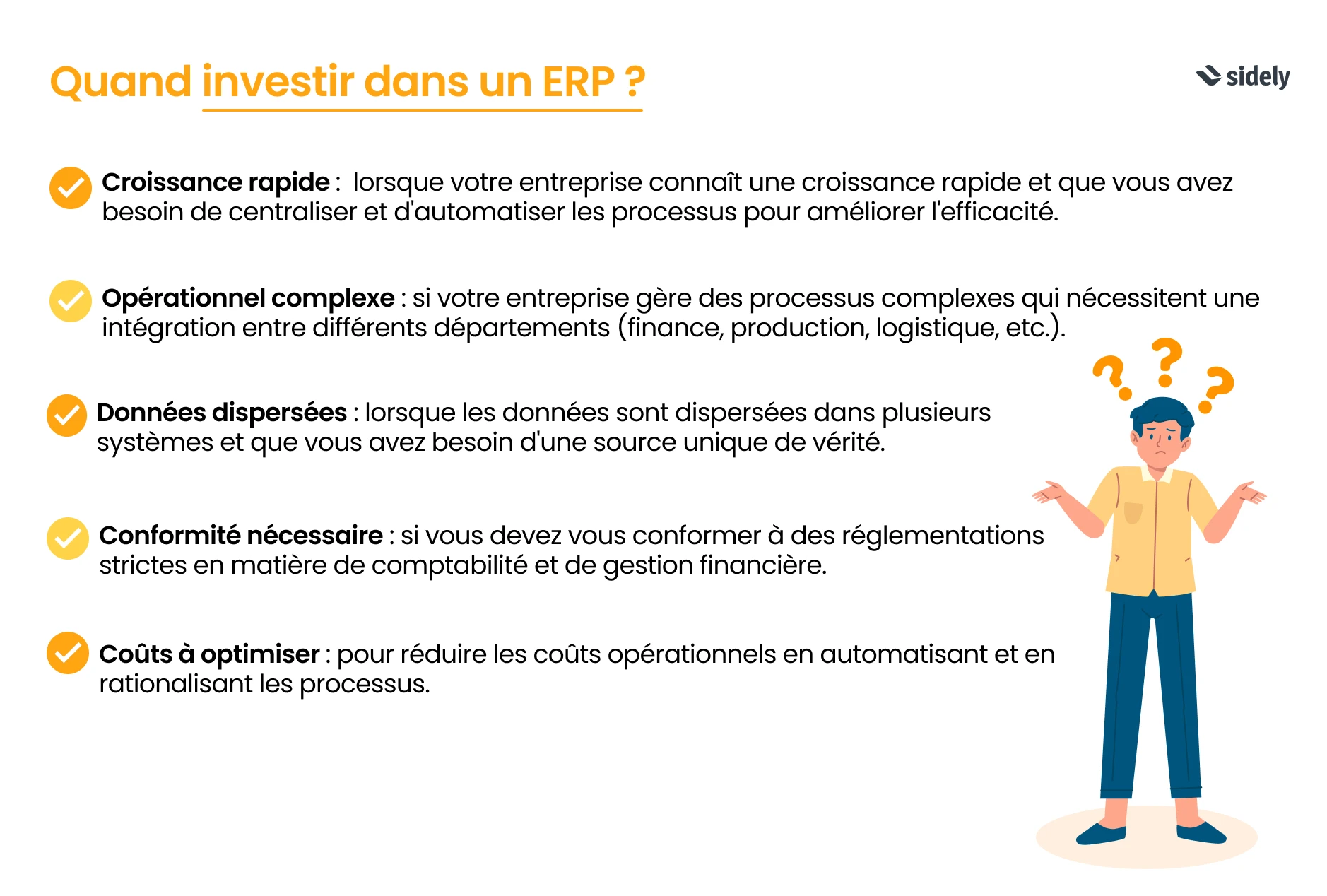
When to invest in an ERP?
Rapid growth: when your company is growing fast and you need to centralize and automate processes to improve efficiency;
Operational complexity: if your business manages complex processes requiring coordination across multiple departments (finance, production, logistics, etc.);
Siloed data: when data is scattered across several systems and you need a single source of truth;
Compliance needs: if you must comply with strict accounting and financial management standards;
Cost optimization: to minimize operational costs by automating and streamlining processes.
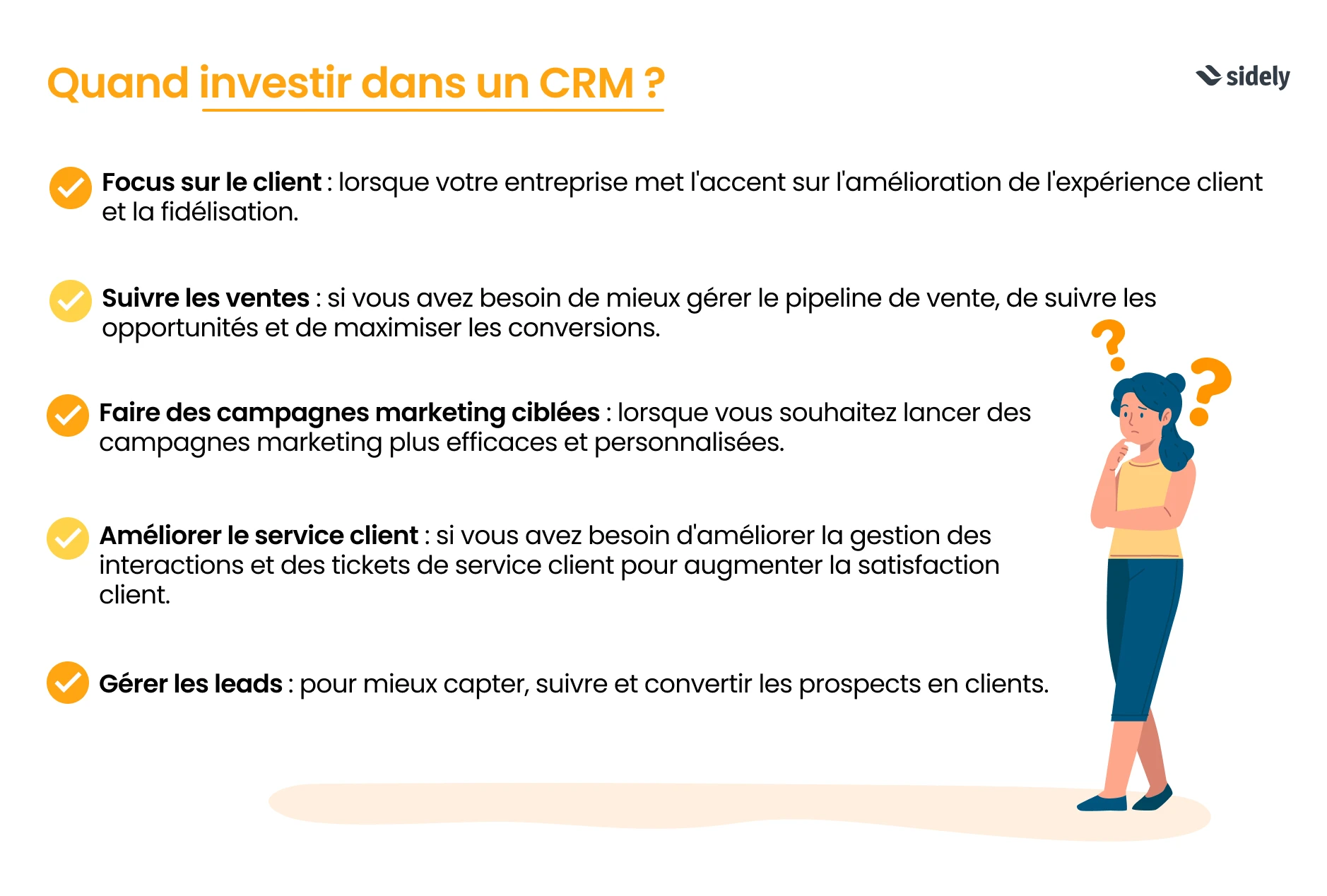
When to invest in a CRM?
Customer centricity: when your company focuses heavily on improving customer experience and retention;
Sales tracking: if you need to better manage the sales pipeline, track opportunities, and maximize conversions;
Targeted marketing campaigns: when you want to launch more effective and personalized marketing campaigns;
Customer service: if you need to improve customer interaction and support ticket management to boost satisfaction;
Lead management: to capture, track, and convert prospects into customers more effectively;
Data centralization: to prevent sales representatives or other commercial stakeholders from hoarding client information;
Operational analysis: to base your strategies on actual field results.
In summary, invest in an ERP to optimize all of your company's internal operations, and choose a CRM to strengthen customer relationships and boost sales and marketing performance.
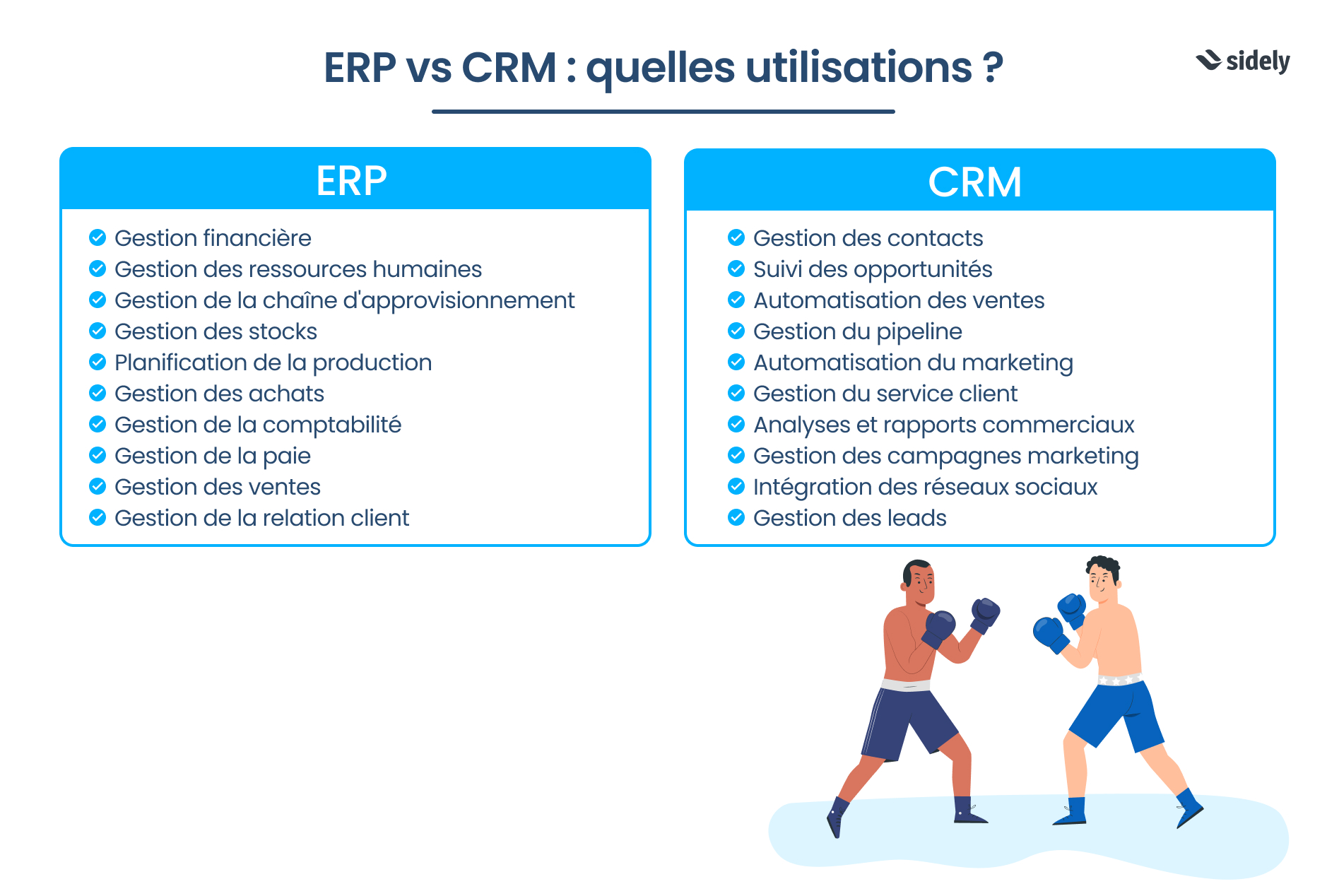
ERP VS CRM: the comparison
You can also list the expected impacts of your new business management software, helping you choose between ERP or CRM with confidence.
ERP | CRM |
|---|---|
- Financial management | - Customer relationship management |
How to choose between an ERP and a CRM?
The choice between an ERP and a CRM primarily depends on your priorities. Do you want to optimize your internal operations, or structure your customer relationships and sales management?
An ERP is designed to automate and centralize all internal processes (finance, production, logistics…), while a CRM is focused on customer experience, lead tracking, and improving sales performance.
Here is a simple table to help you decide:
Invest in an ERP if… | Invest in a CRM if… |
|---|---|
You need to centralize core management processes (HR, purchasing...) | You want to better track your prospects and customers |
Your teams handle large amounts of administrative data | Your teams spend too much time entering customer data in Excel. If this is still happening with a CRM, it might be time to switch solutions! |
You need to automate accounting, logistics, and payroll | You want to manage your sales and marketing campaigns |
You manage a production line or stock across multiple sites | You need to structure field sales visits: from routing to meeting summaries |
You are looking to improve coordination between departments | You want to centralize customer data in a single tool |
Good to know: these tools can complement each other. Many businesses use an ERP for internal business operations and connect a CRM for customer tracking and sales performance. We'll explore this in the next section of this article!
Can you use ERP and CRM together?
To facilitate data flow and centralization, some companies choose to invest in an ERP that includes its own sales module. Indeed, a CRM integrated into an ERP from the same provider usually offers smoother data integration.
Conversely, when the CRM and ERP are not natively integrated or come from different vendors, APIs are often needed to sync data between the two systems. However, connecting or even developing APIs is generally a straightforward task for experienced developers (we explain it all here).
Using separate software providers also prevents putting all your eggs in one basket, limiting systemic failures if an issue arises. Beyond IT risks, it also reduces dependency on a single contract, resource pool, or skillset. That is why separating CRM and ERP is often wiser, even if it means managing more contracts and service providers.
💰 Finally, and perhaps most importantly: not all companies are in a position to invest in an ERP, as the cost is often much higher than that of a CRM (which averages around $25 per user per month, excluding implementation fees).
Still unsure about the best option? Request a demo to discover the benefits of Sidely CRM!
Sidely easily integrates with top market ERPs to streamline your field sales operations.
This two-way integration ensures that all critical data is available in real time within Sidely:
Up-to-date customer files (contact details, outstanding balances, history, etc.)
Product references with pricing, stock levels, and custom conditions
Orders placed from the field are automatically pushed to the ERP
It is especially useful if:
You use a centralized ERP but have a sales team working on the go
Your sales reps need to take orders directly in person
You want to eliminate double entries and manual rekeying errors
What is the difference between an ERP and a CRM?
Can a CRM replace an ERP?
Can you connect a CRM to an ERP?
How do I know if my company needs a CRM or an ERP?
Margot has been working in Tech and SaaS for 8 years, with a multi-product experience that has given her a unique understanding of business challenges. On a daily basis, she analyzes, relentlessly tests, and relies on facts to shed light on market trends and help sales teams move forward.
See also

Artificial intelligence and field professions: what our 2026 studies reveal
Adoption, barriers, use cases: discover what our three studies reveal about the role of AI among sector managers, sales representatives, and foodservice sales reps.

CHR and RHF Sales Representatives: portrait of a relationship-driven profession in the era of data
Equipment, productivity, AI: discover the major trends for the HORECA and food service sales profession in 2026 through our field study.

Pharmaceutical Sales Representative in France: Portrait of a Field Job Under Pressure
Compensation, aspirations, AI usage: discover the major trends in the pharmaceutical sales representative profession in 2026 through our field study.

Area Sales Managers in France: who are they and how is the profession evolving in 2026?
Compensation, aspirations, AI usage: discover the major trends in the field sales representative profession in 2026 through our field study.
The area manager professions in 2026
Discover the trends, the challenges, and the key figures.