

CRM: understanding everything about the different solutions
Sales, marketing, customer service, or operational CRM: discover the 4 main types, their key features, and how to choose the right tool for your business.

In short
13 min read
A CRM centralizes customer, prospect, and partner data, replacing scattered files to streamline customer relationships.
There are four major types of CRM: Marketing (loyalty), Sales (sales), Customer Service (support), and Operations (data quality).
The rise of SaaS and interoperability allows companies to favor specialized tools over overly complex, all-in-one software.
The choice of a CRM should be based on your business priorities (e.g., marketing automation, sales acceleration, data reliability) rather than functional richness alone.
Tools adapted to specific business needs, such as field CRMs for mobile sales forces, are often more effective than standard general-purpose solutions.
The term CRM (Customer Relationship Management) has nowadays become a catch-all term. Behind this familiar acronym, there is an impressive diversity of software, approaches, and promises, so much so that it is not always easy to know what a CRM actually does… nor which one to choose.
Despite a simple and shared logic: being a centralization and collaboration tool, the CRM market has structured itself around several major families, each addressing a specific need and function in the organization.
Complete platforms like HubSpot CRM, which bring marketing, sales, and customer service together in the same environment, now coexist with more specialized tools, adapted to specific professions or needs, like Sidely.
To make matters more complex, the rise of SaaS (Software as a Service) has further expanded the spectrum of available solutions.
This article aims to bring order to this booming ecosystem, by explaining:
what a CRM really is and what it is used for;
what the different categories of CRMs available on the market are;
and how to choose the most suitable solution for your business.
Because understanding the differences between marketing, sales, operational, and customer service CRMs, is above all about giving yourself the means to choose a tool that serves your priorities, and not the other way around.
What is a CRM?
A CRM is a software that allows a company to centralize all data and interactions related to its customers, prospects, and partners. It replaces scattered Excel files, obsolete databases, and incomplete exchange histories.
Thanks to this centralization, information (contact details, exchanges, order histories, statements, photos, opportunities...) becomes accessible to all employees.
A well-chosen CRM (according to your needs) allows you to:
Identify leads and track business opportunities,
Better understand your network of distributors or end customers,
Streamline internal processes (reporting, scheduling, communication),
Automate low-value-added tasks,
And ultimately, focus on sales and business growth.
Collaborative by nature, the CRM acts as a shared information hub: it connects teams and automates repetitive actions (this branch can also be linked to SFA) to streamline the customer relationship at every stage of the journey.
The different types of CRMs
There is no single universal CRM but rather several families of tools, each meeting specific needs.
Historically, some platforms wanted to "do everything": sales, marketing, customer service, accounting, HR... These generalist CRMs often turned into real monsters, complex to set up and expensive to maintain.
Fortunately, the trend has evolved.
Thanks to APIs and software interoperability, companies today can choose specialized CRMs while ensuring the overall consistency of their data.
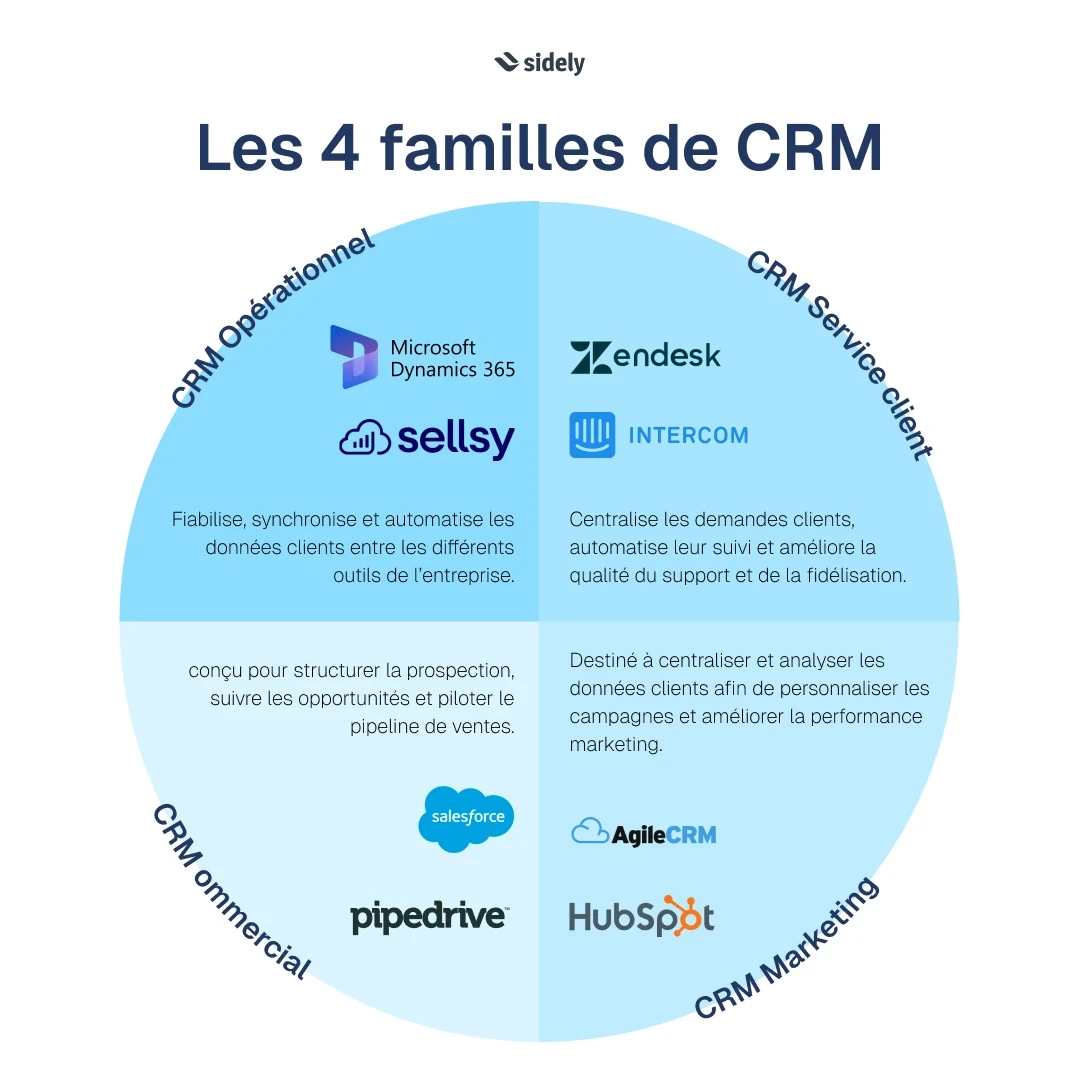
We can thus distinguish four main families of CRMs:
The Marketing CRM, to better know and retain customers,
The Sales CRM, to structure and accelerate sales,
The Customer Service CRM, to manage requests and improve the experience,
The Operations CRM, to make data reliable and connect internal tools.
The Sales CRM
The Sales CRM, or sales tracking CRM, is the essential ally of sales teams. Unlike the Marketing CRM, which focuses on campaigns and personalization, or the Operations CRM, dedicated to data quality, the Sales CRM focuses on accelerating the sales cycle and improving sales performance.
Definition of Sales CRM
A Sales CRM is a tool that centralizes all information related to clients and prospects: contact details, interactions, quotes, orders, history.
It allows sales teams to manage their leads, track opportunities, and each stage of the buying journey (prospecting, qualification, negotiation, closing).
Its main goal is to give salespeople a clear view of their pipeline in order to better target their efforts and increase conversion rates.
According to the Sidely Study conducted among 128 area managers in France, 88.3% of field sales reps use CRM data to prepare for their visits, in which 61.7% do so systematically. The CRM is no longer just a reporting tool: it has become the core of sales preparation.
Key Features of a Sales CRM
Contact and Customer Account Management
The Sales CRM centralizes all data related to customers and prospects: contact details, interactions, purchase history, quotes, and invoices.
Opportunity Tracking and Sales Pipeline
Sales reps can visually track each of their deals, step by step, in a clear and structured pipeline.
Sales Task Automation
The CRM frees up time for selling: automatic creation of reminders, sending standard emails, follow-up notifications...
Reporting and Forecasting
Dashboards help managers track sales performance and adjust strategy.
Team Collaboration
Since data is shared, marketing, support, and sales teams work on a common basis.
Concrete Example of Use
A B2B distributor uses its Sales CRM to track the activity of its field sales reps. Each prospect is integrated into the CRM, meetings are scheduled directly from the mobile app, and follow-ups are automated.
The sales director thus has a real-time view of the pipeline and revenue forecasts.
Benefits of a Sales CRM
Simplified organization for sales teams
Precise tracking of opportunities
Time savings through automation
Clear view of the pipeline and forecasts
Smooth collaboration between departments
⚠️ Not all sales CRMs are created equal
Not all sales CRMs meet the same needs.
Some generalist tools are very effective for managing a classic sales cycle (prospecting, qualification, signing). But when sales development relies on geography and the management of a network of retail outlets, their limits quickly appear.
If your business depends on regular field visits, loyalty programs, and distributor tracking, or the management of local operations (promotions, merchandising, re-shelving), a basic sales CRM won't be enough.
In this case, it is better to turn to an industry-specific CRM, designed for roaming teams and distributed companies.
These solutions, like Sidely, natively integrate features adapted to your field reality: route planning, shelf-space tracking, visit reports, territory management, geographic reporting, and multi-network analysis.
Such a tool allows you to structure the customer relationship over time, capitalize on local data, and turn every visit into a lever for loyalty and growth.
Despite high engagement, only 43.3% find their data easy to leverage. And a revealing paradox: the more data-driven teams are, the more they suffer from the limits of their tools. The teams that use data the most are also the ones that find it the most time-consuming.
This is precisely the problem that an industry-specific CRM like Sidely addresses: a tool designed to make field data immediately readable and actionable. Observed result among our users: +0.5 visits per day thanks to route optimization, which translates to about 115 additional visits per salesperson per year, and 30 minutes of planning time saved each week.
Salesforce: An Example of a Comprehensive Sales CRM
Salesforce is a global benchmark in Sales CRM. It offers a robust and highly customizable platform, tailored to all sectors.
Visual Pipeline: tracking opportunities at each stage.
Sales Automation: reminders, follow-ups, automatic tasks.
Reliable Forecasts: up-to-date performance indicators.
Total Mobility: mobile application for field sales reps.
Multiple Integrations: connection with marketing, support, or ERP tools.
💡 Concrete Example:
When a prospect opens a quote, Salesforce automatically sends an alert to the sales rep, who can recontact the client at the right moment.
The Marketing CRM
The Marketing CRM is the cornerstone of any customer-centric strategy. It helps marketing teams collect, segment, and leverage data to design personalized and effective campaigns.
Definition of Marketing CRM
The Marketing CRM centralizes all customer information (purchase history, interactions, online behavior) in order to:
segment the base according to relevant criteria,
automate campaigns,
measure performance.
Its goal is to turn data into a lever for loyalty and growth.
Key Features of a Marketing CRM
Centralization of Customer Data
All useful information is grouped into a single database: purchase history, web browsing, reactions to campaigns, demographic data, etc.
Segmentation and Targeting
The Marketing CRM allows for classifying clients and prospects by profile, behavior, or purchasing potential (average basket value, purchase frequency...). This segmentation makes it easier to send personalized and relevant messages.
Marketing Automation
With marketing automation features, it is possible to schedule email, SMS, or notification campaigns based on the customer lifecycle.
Analysis and Reporting
Marketing teams can measure the performance of their campaigns using specific dashboards and reports: open rates, click-through rates, conversions, return on investment (ROI).
Loyalty and Customer Experience
A Marketing CRM is not solely dedicated to acquiring new clients. It also helps to boost loyalty by offering personalized promotions and monitoring the satisfaction of existing customers.
Concrete Example of Use
A cosmetics brand uses its Marketing CRM to launch a repurchase campaign. The brand identifies clients who purchase a skincare product every x months. It schedules an automatic email offering a discount before the bottle runs out, thereby increasing repurchases. Thanks to discount codes and email tracking, the brand can then analyze whether this action generated new sales and, consequently, calculate the ROI of this type of initiative.
Benefits of a Marketing CRM
Better understand customer behaviors
Increase the effectiveness of marketing campaigns
Personalize communication on a large scale
Improve customer loyalty and satisfaction
Optimize return on investment (ROI)
HubSpot: An Example of a Comprehensive Marketing CRM
Among the solutions available on the market, HubSpot CRM stands out as a benchmark for Marketing CRMs.
By combining data collection, personalization, and automation, HubSpot perfectly illustrates what a modern Marketing CRM can bring to companies:
Centralized Database: all customer and prospect information is grouped in a single tool.
Advanced Segmentation: creation of smart lists based on behavior, journey, or profile.
Campaign Automation: personalized emails, workflows, automated follow-ups.
Performance Tracking: detailed reports on open rates, clicks, conversions, and ROI.
Integration with Sales CRM: marketing and sales teams share the same data, promoting alignment.
💡Concrete Example:
When a prospect downloads a white paper, HubSpot automatically triggers a series of emails tailored to their stage of purchase readiness. Behavioral data (clicks, page views) are fed back into the CRM so that the sales rep can step in at the right time.
The Operations CRM
The Operations CRM plays a key role behind the scenes of a business. Unlike Marketing or Sales CRMs, it is not oriented toward "customer action" but rather "data quality."
Definition of Operations CRM
An Operations CRM is software that ensures the centralization, quality, synchronization, and automation of customer data across all systems and tools used by the company: sales CRM, ERP, marketing tool, invoicing, etc.
Unlike the Marketing CRM, which focuses on campaign personalization, or the Sales CRM, which helps manage business opportunities, the Operations CRM acts behind the scenes to guarantee that all teams work with consistent, centralized data.
Its role is to create a single source of truth to avoid duplicates, errors, and loss of information, thus ensuring that all teams have a consistent, up-to-date, and synchronized information base.
Key Features of an Operations CRM
Data Centralization and Cleaning
The Operations CRM groups all customer and prospect data into a single database. It removes duplicates and standardizes fields (phone numbers, addresses, statuses).
Synchronization Between Tools
It connects different systems (ERP, invoicing software, sales CRM, marketing automation, customer support) to ensure a smooth flow of information.
Internal Process Automation
Workflows and business rules automate tasks like status updates, notifications, or alert creation.
Reports and Analysis
With unified and clean data, the Operations CRM provides reliable reports to guide strategic decisions.
Concrete Example of Use
A SMB uses an Operations CRM to manage its customer cycle. When a prospect becomes a customer, the CRM automatically updates their status. The invoicing teams then receive the information without having to re-enter it. Sales reps have a complete view of customer history (orders, payments, exchanges), and management accesses reliable consolidated reports drawn from clean data.
Benefits of an Operations CRM
A single and reliable customer database
A customer view shared across all departments
Fewer errors and duplicates
No manual re-entry
Time savings through the automation of internal processes
Better collaboration between teams (sales, marketing, finance, support)
Simplified strategic steering thanks to clear reporting
Sellsy: An Example of a Comprehensive Operations CRM
It combines CRM, invoicing, and accounting into the same platform.
Total Centralization: customer data is accessible to all departments.
Automatic Updates: no more data re-entry between departments.
Integrated Automations: quote creation, invoice generation, payment tracking.
360° Customer View: full history of interactions and transactions.
💡 Concrete Example:
When a quote is signed in Sellsy, the contact's status automatically changes from "prospect" to "customer," the invoice is generated, and the support department receives a notification to schedule the first onboarding.
The Customer Service CRM
The Customer Service CRM is a tool dedicated to managing client requests and improving the post-purchase experience.
Where the sales CRM helps manage sales and the marketing CRM personalizes campaigns, the customer service CRM focuses on the post-sales experience and loyalty.
Definition of Customer Service CRM
A customer service CRM is software designed to assist support teams in managing, tracking, and resolving client requests.
This type of CRM centralizes all customer interactions, regardless of the channel used (email, phone, chat, or social media), thus ensuring effective tracking of support tickets and improving team response times.
The goal is to strengthen customer satisfaction and loyalty, ensuring that each request is processed quickly, efficiently, and in a personalized manner.
Key Features of a Customer Service CRM
Centralization of Interactions
All requests and exchanges with customers are grouped in a single platform, regardless of the channel used (phone, email, chat, social media).
Ticket Management and Tracking
Every request becomes a ticket assigned to the right person, with defined resolution deadlines.
Support Automation
The CRM reduces processing times: automatic routing, alerts, pre-configured answers...
Knowledge Base
A library of articles and FAQs helps customers find answers to common questions themselves.
Customer Satisfaction Analysis
Metrics like CSAT, NPS, or average response time help measure the quality of service.
Concrete Example of Use
An e-commerce business receives hundreds of messages daily through various channels. With its Customer Service CRM, it centralizes all requests into a single dashboard, automates sorting, and notifies the relevant agents. When a customer reports, for instance, a delivery issue via email, a ticket is automatically created. The ticket is then assigned to a competent agent based on the type of request. Upon closing the ticket, the customer receives a satisfaction survey.
Benefits of a Customer Service CRM
Complete view of customer interactions
Faster request processing
Reduction in customer dissatisfaction rates
Boosted customer loyalty
Continuous support improvement
Zendesk: An Example of a Comprehensive Customer Service CRM
Zendesk is one of the most widely used CRMs for managing customer support. It makes it easy to manage multi-channel tickets and track satisfaction in real-time.
Channel Centralization: email, chat, phone, social media.
Automatic Routing: each ticket is assigned to the appropriate agent.
Automation and Alerts: deadline tracking, automated reminders.
Key Indicators: CSAT, resolution rate, average response time.
💡 Concrete Example:
When a customer reports an issue on an order, Zendesk creates a ticket, assigns it to the appropriate department, and keeps the customer informed of its progress until resolution.
The Specific Case of HubSpot: The All-in-One CRM
Some tools have chosen to move beyond the logic of a single-use CRM. This is the case with HubSpot, which has developed a modular approach capable of covering the entire customer lifecycle, from marketing to retention.
Its concept is based on a free core CRM, enhanced by various Hubs, which are add-on modules addressing specific needs: attracting, selling, delighting, automating.
HubSpot has structured its platform around four main pillars:
the Marketing Hub to generate and qualify leads,
the Sales Hub to track and close business opportunities,
the Service Hub to manage the post-sale relationship,
and the Data Hub to ensure data reliability and internal automation.
The entire platform runs on the same shared database, enabling marketing, sales, and support teams to collaborate without information gaps.
With this approach, it can be said that HubSpot groups three major types of CRMs:
Marketing
Sales
Customer Support
Which type of CRM should you choose based on your needs?
The choice of the right CRM depends above all on your business priorities.
Here is a practical guide to identifying which type of CRM best matches your needs, along with concrete examples of solutions.
Need: Personalize campaigns and better understand customers
Solution: The Marketing CRM
The Marketing CRM is intended for companies that want to leverage their customer data to create targeted and measurable campaigns.
Problem: Campaigns are too generic, results are difficult to interpret, and retention is low.
Solution: A Marketing CRM allows you to segment your customer base, automate campaigns (email, SMS, notifications), and analyze performance.
Example: HubSpot helps marketing teams create personalized workflows, track lead behavior, and measure the ROI of each action.
→ Ideal for: marketing teams wishing to improve precision, efficiency, and return on investment.
Need: Increase sales and better manage opportunities
Solution: The Sales CRM
The Sales CRM supports sales teams in managing their prospects, negotiations, and clients. It facilitates pipeline tracking and automates repetitive tasks.
Problem: Opportunities are poorly tracked, the pipeline lacks visibility, and follow-ups fall through the cracks.
Solution: A Sales CRM centralizes contacts, structures deal tracking, and automates follow-ups.
Example: Salesforce allows you to visualize the pipeline, track opportunities, and generate reliable revenue forecasts.
→ Ideal for: sales teams that want to structure their sales, improve tracking, and increase their conversion rate.
💡 Please note: If your commercial development relies on a distribution network or field visits, a standard sales CRM won't be enough. Choose a CRM that adapts to the particularities of your business, your sales environment, and the way your mobile sales reps work.
An industry-specific CRM like Sidely will be more suitable: it integrates features designed for mobile sales forces and meets concrete needs often missing in generalist CRMs, such as tracking points of sale, shelf audits, or geographic territory management.
Need: Offer responsive customer support and boost loyalty
Solution: The Customer Service CRM
The Customer Service CRM is designed to assist support teams in managing and resolving customer requests. It allows for a seamless, consistent, and personalized experience after the sale.
Problem: Customer requests arrive from multiple channels and are difficult to centralize or track.
Solution: A Customer Service CRM groups all interactions (email, chat, phone, social media) and automates their processing through a ticketing system.
Example: Zendesk centralizes multi-channel requests, automatically distributes tickets to the right agents, and measures satisfaction at every interaction.
→ Ideal for: support teams that want to improve responsiveness, reduce handling times, and retain their clients.
Need: Make data reliable and connect internal tools
Solution: The Operations CRM
The Operations CRM acts in the background to ensure the consistency and reliability of customer data across the company's entire digital ecosystem.
It guarantees that information flows error-free between systems (CRM, ERP, marketing automation, invoicing...).
Problem: Data is scattered across multiple tools, leading to duplicates, inconsistencies, and lost information.
Solution: An Operations CRM centralizes, cleans, and synchronizes data, while automating certain internal processes.
Example: Sellsy integrates CRM, invoicing, and accounting into a single interface, ensuring a unified view of the customer and always up-to-date data.
→ Ideal for: multi-tool or growing businesses that want to make their data reliable and streamline their internal processes.
Summary Table: Which CRM for which need?
Primary / Secondary Need | Type of CRM | Example Solution | Key Objective |
|---|---|---|---|
Increase sales and manage pipeline | Sales CRM | Salesforce | Structure and accelerate the sales cycle |
Personalize marketing campaigns | Marketing CRM | HubSpot | Automate and measure campaigns |
Improve support and loyalty | Customer Service CRM | Zendesk | Centralize and optimize customer relations |
Reliabilize data and connect systems | Operations CRM | Sellsy | Guarantee a unique and automated base |
Align sales and marketing (SMarketing) | Marketing + Sales CRM | Hubspot | Unify lead management and improve conversion |
Improve internal collaboration | Operations CRM | Sellsy | Fluidify exchanges between departments through single-source data |
Anticipate customer needs using analytics | Customer Service CRM + BI | Zendesk + Power BI | Leverage data to improve satisfaction and retention |
Support growth and internationalization | Sales + Operations CRM | Salesforce + Sellsy | Standardize processes and harmonize data on a large scale |
The CRM market today is as vast as it is diverse.
Behind this single acronym hide solutions with very different objectives, use cases, and levels of complexity. Some are designed for marketing, others for sales, customer support, or data management.
But they all have one thing in common: facilitating collaboration around customer data to make each interaction more efficient and each decision more informed and concrete.
To choose your CRM wisely, the trick is not to find "the most complete" one, but the most suitable for the way you work.
A simple tool aligned with your processes is better than a oversized and under-utilized platform.
If your priority is to personalize your campaigns, a Marketing CRM will be your best ally.
If you're looking to structure your sales, opt for a Sales CRM.
If you wish to improve retention, a Customer Service CRM is a must.
And if your challenge is to make your data reliable and connect your tools, an Operations CRM will meet your expectations.
Finally, for companies whose commercial success relies on the field, geography, or a distribution network, choosing an industry-specific CRM is often the key.
A few extra Q&As
What are the main types of CRMs?
We generally distinguish four types of CRMs:
Marketing CRM: to manage campaigns and customer segmentation;
Sales CRM: to track sales and opportunities;
Customer Service CRM: to centralize requests and build loyalty;
Operations CRM: to make internal data reliable and synchronize it.
What is the difference between a sales CRM and a marketing CRM?
The sales CRM is centered on pipeline management, prospecting, and sales tracking, whereas the marketing CRM focuses on collecting and analyzing customer data to design targeted campaigns. Deeply complementary: the former converts leads, the latter attracts them.
What is an industry-specific CRM or vertical CRM?
An industry-specific CRM is specialized software designed to meet needs unique to a sector or a specific way of working (mobile sales forces, distribution networks, retail, hospitality...). It integrates tailor-made features (route planning, customized forms, offline work) and does not require complex developments.
As an example, in supermarkets and hypermarkets, 73.4% of area managers are equipped with an SFA CRM, but 18.2% of juniors start without any CRM at all, and 54.7% now use smartphones as their primary support. A generalist CRM not optimized for mobile is a direct obstacle: 80% of young field reps deprived of mobile access view it as a physical handicap in their daily work.
How do I know which CRM is right for my company?
The right CRM depends on your business priorities:
improving sales → sales CRM;
marketing automation → marketing CRM;
retention and loyalty → customer service CRM;
data reliability → operations CRM.
And if your activity relies on the field or a network of retail outlets, an industry-specific CRM will be the most suitable.
An illuminating statistic to take into account in your choice: 97.5% of field sales reps declare that data influences their actions, but less than one in two finds it easy to use. Before choosing a CRM, the right question is therefore not "which is the most complete?" but "which makes my data immediately usable by my teams, on their main device, in their actual work context?"
Margot has been working in Tech and SaaS for 8 years, with a multi-product experience that has given her a unique understanding of business challenges. On a daily basis, she analyzes, relentlessly tests, and relies on facts to shed light on market trends and help sales teams move forward.
See also

Artificial intelligence and field professions: what our 2026 studies reveal
Adoption, barriers, use cases: discover what our three studies reveal about the role of AI among sector managers, sales representatives, and foodservice sales reps.

CHR and RHF Sales Representatives: portrait of a relationship-driven profession in the era of data
Equipment, productivity, AI: discover the major trends for the HORECA and food service sales profession in 2026 through our field study.

Pharmaceutical Sales Representative in France: Portrait of a Field Job Under Pressure
Compensation, aspirations, AI usage: discover the major trends in the pharmaceutical sales representative profession in 2026 through our field study.

Area Sales Managers in France: who are they and how is the profession evolving in 2026?
Compensation, aspirations, AI usage: discover the major trends in the field sales representative profession in 2026 through our field study.
The area manager professions in 2026
Discover the trends, the challenges, and the key figures.