

Sales CRM: definition, benefits and uses for sales teams
Understand in concrete terms what a sales CRM brings to your organization, its daily uses, its measurable benefits, as well as the essential criteria for choosing a solution that fits your needs.

In short
15 min read
A sales CRM centralizes all customer and prospect data to structure sales activity and ensure reliable information.
As a true steering tool, it allows for the effective management of the pipeline, prospecting, and opportunity tracking to improve results.
A necessary distinction exists between sales CRM (focused on selling), marketing CRM (lead generation), and customer service CRM (retention).
For field sales forces, a specialized solution with mobile features, mapping, and offline usability is often more suitable than a generalist tool.
The success of a CRM project relies less on the technical choice and more on team adoption and the tool's alignment with real field practices.
A sales CRM is software designed to structure and manage sales activity, from lead management to the tracking of opportunities and client relationships. Today, it serves as a central foundation for organizing sales information, securing reliable field data, and improving the performance of sales teams.
This subject has become strategic because sales organizations operate in an increasingly complex environment. With the multiplication of channels, increased customer expectations, geographic dispersion of teams, and pressure on results, sales forces must be more efficient, more reactive, and better managed.
That is why relying on unsuitable or poorly utilized tools can quickly slow down sales execution and limit decision-making. The choice of a sales CRM is therefore no longer just an IT project, but a true organizational and performance challenge.
The objective of this article is to provide you with a clear and practical vision of the sales CRM. You will find a precise definition, its daily uses, its measurable advantages, as well as the essential criteria for choosing a simple solution tailored to your organization, particularly when sales rely on field teams.
What is a sales CRM?
The first sales CRMs appeared at the end of the 1990s, in a context marked by the computerization of sales forces and the rise of customer databases. These solutions, largely driven by American vendors like Salesforce, primarily aimed to centralize sales information and structure sales processes in organizations that were often very sedentary. For many years, the sales CRM market was thus dominated by American players, with tools designed according to Anglo-Saxon standards.
Today, this dynamic has evolved: we now find European, and even French, sales CRMs that are better aligned with field realities, local regulatory constraints, and the practices of mobile sales teams.
Definition of Sales CRM
A sales CRM is a customer relationship management software specifically designed to manage sales activity. It allows for the centralization of customer and prospect data, tracking of sales opportunities, organization of prospecting, and structuring of the daily work of sales teams.
The sales CRM thus constitutes a key tool for making sales information reliable, prioritizing actions, and improving the performance of sales forces. It is now one of the core daily business tools for sales representatives and field agents.
A sales CRM can be deployed in different ways. Historically, solutions were installed on-premise directly on the company's servers to maintain full control over the infrastructure and data. Today, the majority of sales CRMs are offered in SaaS mode, accessible via a browser or a mobile application, without complex local installation. This model facilitates deployment, maintenance, and updates. The SaaS sales CRM has thus established itself as the standard for sales organizations looking for flexibility and scalability.
Difference between sales CRM, marketing CRM, and customer service CRM
The term CRM actually covers several distinct uses that meet different business objectives. It is therefore essential to distinguish between sales CRM, marketing CRM, and customer service CRM to choose a solution that is truly adapted to your needs. For this, we advise you to consult our comprehensive overview of the different types of CRM.
The sales CRM is centered on sales activity. It supports sales teams in managing leads, tracking opportunities, organizing meetings, and managing the sales pipeline. Its main objective is to improve sales efficiency and visibility of field activity.
The marketing CRM comes into play earlier in the sales cycle. It is designed to manage marketing campaigns, segment contacts, automate nurturing actions, and measure the performance of acquisition actions. This type of CRM is particularly focused on lead generation and qualifying contacts before transmitting them to sales teams.
Finally, the customer service CRM focuses on the post-sales relationship. It allows for tracking customer requests, managing support tickets, centralizing exchanges, and improving customer satisfaction over the long term. It plays a key role in retention and the quality of the customer experience.
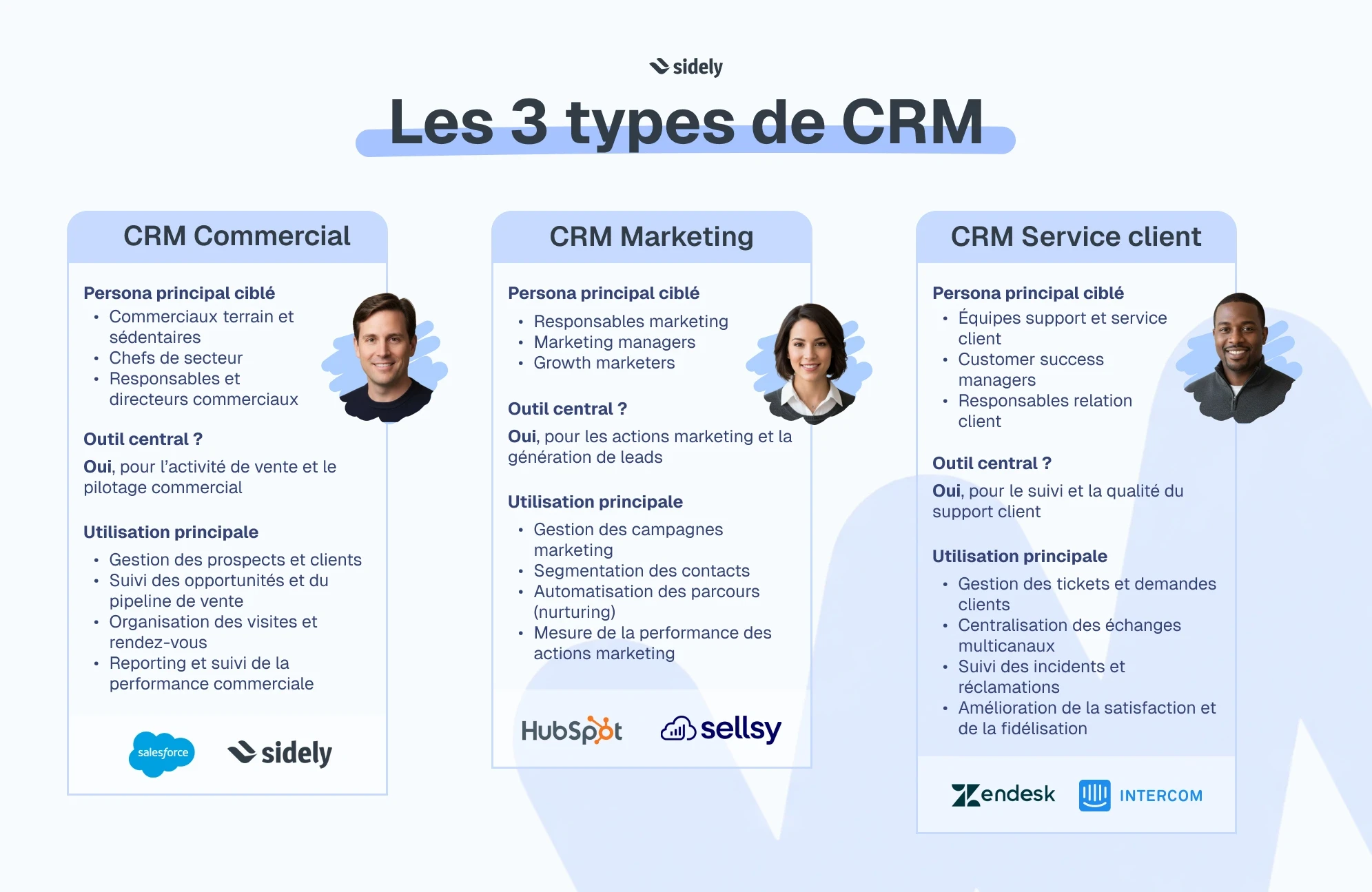
In practice, some solutions combine these three dimensions. However, for field or mobile sales teams, a specialized sales CRM often remains more relevant than a generalist tool covering the entire customer relationship.
Who is a sales CRM for?
A sales CRM is aimed at organizations that wish to structure, manage, and optimize their sales activity.
It concerns several profiles within the company, each with specific expectations and uses, but a common goal: to better manage the customer relationship and improve sales performance.
The sales CRM is a central tool shared across the entire sales chain. It is the core software for sales representatives, whether they are inside or field-based. It supports them in their daily routine and becomes a true operational asset for field teams, especially when it is accessible on mobile. Sales management and sales directors use the sales CRM more as a management and decision-making tool.
Sales agencies that deploy outsourced sales forces also need a CRM.
What is a sales CRM used for on a daily basis?
A sales CRM is not a data storage tool. Fully adopted by sales reps and used correctly, it structures sales activity, secures information, and concretely improves team performance, both in the field and at the management level.
Centralize customer and prospect data
One of the primary roles of a sales CRM is to centralize all customer and prospect data into a single tool, shared by all sales teams. Everything in one place.
Sales teams can lose up to 20% of their time searching for customer information when they do not have a centralized tool. This centralization helps limit information loss, which is still very common when data is scattered across different tools, or worse, different Excel files.
Manage sales prospecting
The sales CRM also plays a key role in the organization and tracking of prospecting. It makes it possible to structure prospect lists, prioritize sales actions, and precisely track the progress of steps, whether they are calls, visits, or follow-ups. The CRM thus becomes a lever for sales efficiency: companies that structure their prospecting using a CRM see on average a 15% to 25% increase in the conversion rate of prospects into opportunities.
Track opportunities and the sales pipeline
Tracking opportunities is another fundamental use of sales CRM. By visualizing the sales pipeline, sales reps and managers have a clear, shared view of ongoing deals, their level of progress, and the likelihood of closing sales (or not).
This visibility improves the quality of sales forecasts and helps to better anticipate: organizations equipped with a structured CRM typically display revenue forecasts that are 20% to 30% more reliable than those relying on manual tools.
Improve the tracking of sales visits and meetings
For field teams, sales CRM comes into its own when tracking visits and meetings. Every customer interaction can be tracked, documented, and utilized, both before and after the visit. The sales representative gains efficiency, while the company retains a reliable memory of the customer relationship.
Companies that formalize their reports and action plans via a CRM often observe a 10% to 20% increase in sales productivity, linked to better preparation for meetings and more rigorous follow-up.
Discover how Sidely facilitites the tracking of sales visits in the field
The main advantages of a sales CRM
Beyond daily uses, a sales CRM brings measurable benefits, both for sales teams and for management. When properly adopted, it becomes a true sales performance lever.
Time-saving for sales reps
By centralizing information and automating certain follow-up tasks, a sales CRM allows sales reps to refocus on their core business: selling. Companies equipped with a CRM see on average a 15% to 20% time savings on administrative tasks, which translates to more time spent in meetings or prospecting.
Better visibility for sales management
The sales CRM offers a consolidated view of team activity in real time. Managers can monitor progress toward objectives, sales coverage, and individual performances. This visibility allows for quicker and more relevant decision-making, with revenue forecasts up to 30% more reliable than with manual tools.
Improvement of the customer relationship
Thanks to better tracking of interactions and deeper customer knowledge, sales CRM helps improve the quality of exchanges. Companies that make effective use of their CRM data observe a 10% to 15% increase in customer satisfaction rates, linked to more personalized and consistent communication over time.
Reliability of sales reporting
By structuring the flow of information from the field, sales CRM makes reporting more reliable and limits re-entry of data. Organizations that abandon manual tracking sheets in favor of a CRM reduce reporting errors by an average of 25% to 40%, while gaining responsiveness.
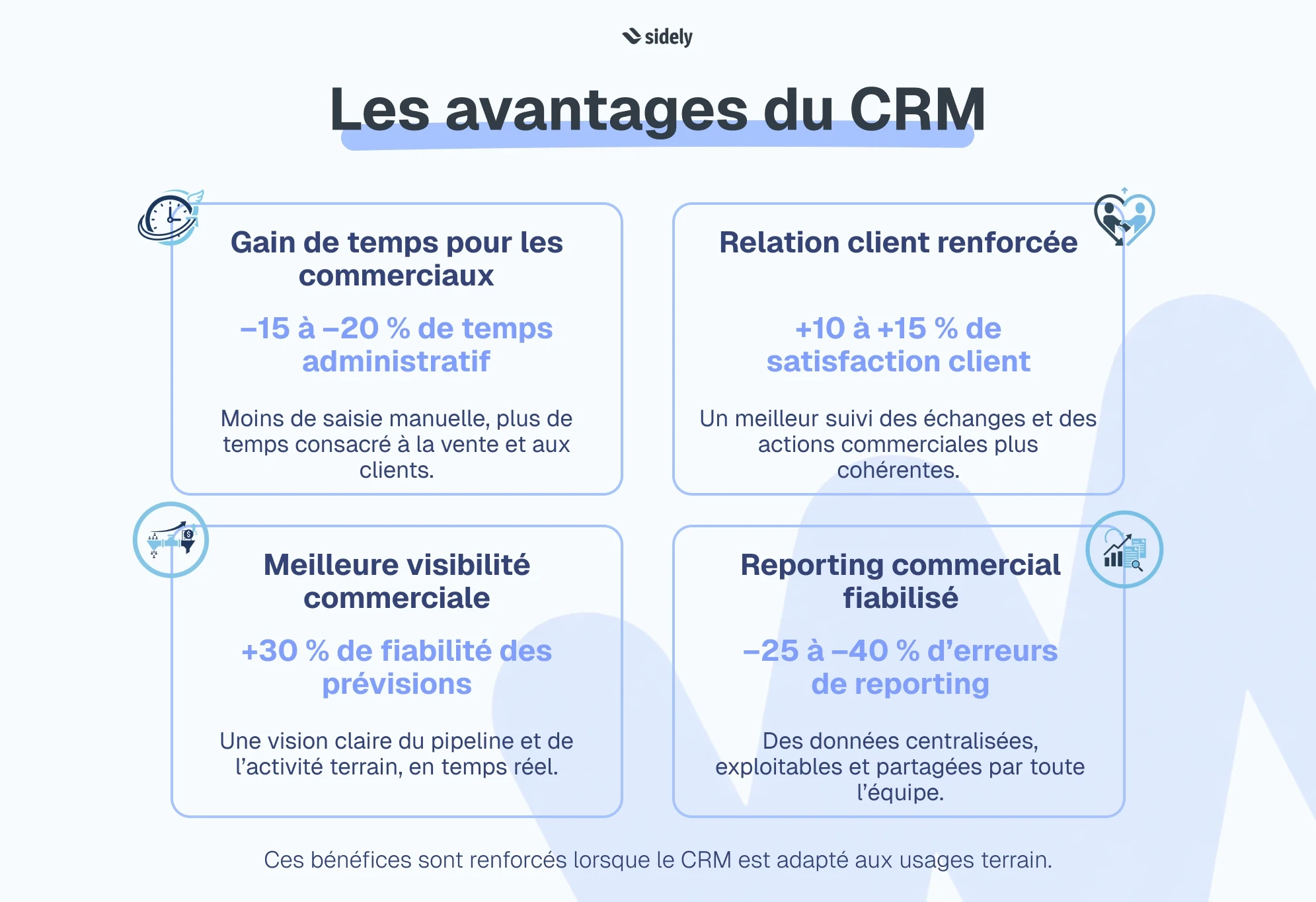
In summary, a sales CRM does not just organize sales activity. It still needs to be fully exploited to extract its full value, by adapting the tool to the real practices of the teams and supporting its adoption.
Sales CRM and field sales forces: a specific challenge
Since the beginning of this article, we have reviewed the fundamentals of sales CRM—a common foundation for both inside and outside sales teams. Now, I want to look at the specific and often underestimated challenges of choing a CRM when you are a field sales force. Because a mobile sales force does not use a CRM under the same conditions or with the same constraints as an office-based team. The choice of CRM therefore has a direct impact on adoption, data quality, and ultimately, sales performance.
The limitations of office-based CRMs
CRMs historically designed for office use quickly show their limitations when deployed to mobile sales reps. Interfaces poorly suited for mobile, tedious data entry after meetings, dependence on a stable internet connection: all of these are constraints that hinder daily use of the tool in the field.
This mismatch is logical. A "classic" sales CRM was thought out for office conditions, whereas the work of field teams relies on radically different environments. It is a bit like giving a company car without a trunk to an area manager: the vehicle runs, but it is not designed to transport products, samples, or equipment. In the same way, a CRM not designed for mobile work functions technically but does not meet the actual operational needs of field sales reps.
In organizations where the CRM is not tailored to field practices, a significant portion of sales information is not reported. It is estimated that up to 30% of data from client visits can go unused when reports are entered late or incompletely. This results in a more fragile adoption of the CRM in the field.
CRM Use Case: Area managers, mobile sales reps
For area managers and mobile sales representatives, the sales CRM is primarily a field execution tool. It allows them to plan routes, optimize sales coverage, prepare for visits, and report on actions taken directly from the field.
When a CRM is truly adapted to these uses, companies observe better coverage of points of sale, increased regularity of visits, and more structured data reporting. The CRM then becomes a daily operational aid, rather than an additional administrative burden.
To make it easier to choose your CRM for area managers, we have put together a comparison of situations they might encounter in the field and how each tool can help address them.
CRM Use Case: National Sales Directors and sales managers
For National Sales Directors, the challenge is different but just as strategic. They need a consolidated, reliable, and uniform view of field activity, covering all regions and teams.
A suitable sales CRM makes it possible to centralize data from the field, compare performances across geographic zones, and quickly identify gaps in relation to objectives. Sales departments that rely on a structured CRM see a significant improvement in reporting quality, with faster analyses and decisions better aligned with field reality.
To facilitate the choice of your sales tool, we have created a CRM, SFA, and spreadsheet comparison for National Sales Directors.
How to choose a sales CRM adapted to your organization?
Choosing a sales CRM is not just about comparing features or prices. It is, above all, a structural decision that must take into account the sales organization, the actual usage patterns of the teams, and the sales model. Before starting, it is essential to clarify your needs and constraints using a clear methodology and checklist.
A relevant CRM is a tool that integrates naturally into the daily routine of teams, supports sales performance, and facilitates management without adding unnecessary complexity.
Essential functional criteria
A sales CRM must cover the fundamental features of sales: client and prospect management, opportunity tracking, pipeline management, activity reports, and performance tracking. These blocks are generally well present in so-called office-based CRMs, designed for teams working mainly from the office.
However, when sales activity relies on a mobile sales force, these basic features are no longer enough. Many generalist CRMs then show their limits. Key features are often missing, such as an integrated map to visualize clients and prospects, route optimization tools, true field forms for records or audits, or even integrated ordering with automatic generation and sending of PDF sales documents. Management also remains too static too often, with generic indicators that do not reflect business realities.
A sales CRM truly adapted to field teams must offer features designed for mobility and operational execution, while remaining simple to use.
Drafting a precise specification sheet helps operationalize these needs and avoid a default choice.
The importance of usability and mobility
For a mobile sales force, the choice of a CRM cannot be separated from its actual use in the field. A sales CRM must be designed to make the work of sales reps easier, not harder. Mobile plays a central role here, as it deeply transforms the way sales teams work on a daily basis. As such, mobile CRMs are increasingly positioning themselves as the future of selling.
Access to client information before a visit, immediate entry of reports after a meeting, and viewing schedules in real time improve both sales efficiency and the quality of interactions. When the CRM is accessible at the right time and place, it becomes a true operational support rather than just a reporting tool.
Usability is a key factor in adoption. A CRM can be functionally rich, but remain underutilized if its interface is not adapted for mobile use. For a field sales rep, the tool must be quick to learn, readable on a smartphone or tablet, and usable even when there is no network connection.
Companies that equip their sales forces with a well-designed mobile CRM see an average 20% to 25% increase in the tool's adoption rate, as well as a significant improvement in the reliability of information reported from the field.
Integration with existing tools (ERP, BI, etc.)
Finally, a sales CRM never functions in isolation. It is part of an ecosystem of existing tools, such as the ERP, invoicing solutions, business intelligence tools, or reporting platforms.
Choose a solution that integrates easily with other market players. Smooth integration avoids re-entering data, makes data reliable, and offers a coherent view of sales activity, from the field up to strategic management. The choice of CRM must therefore integrate the issue of connectors from the very beginning.
The cost of sales CRM solutions
The cost of a sales CRM can vary greatly depending on the solutions, the features offered, and the deployment model. Today, there are CRMs at all price points, from tools accessible per user per month to more complex solutions requiring a structured project.
Beyond the listed price, the real cost of a sales CRM must be evaluated in its entirety: configuration, integrations, deployment support, team training, and long-term adoption. A cheap but poorly adapted tool can quickly generate hidden costs due to low usage or multiple data entries.
That is why we recommend precisely analyzing the different cost components of a CRM project and understanding what actually influences the budget to control the total costs of your CRM project.
Examples of sales CRM software
The French sales CRM market includes very different solutions, ranging from generalist international platforms to European or French CRMs specialized in certain areas. The choice mainly depends on company size, sales model (inside or field), and the level of specialization expected.
Generalist CRMs
Generalist CRMs are aimed at companies looking for a cross-functional solution capable of covering sales, sometimes marketing and customer service, with high customization capabilities.
Software | Nationality | Target Company Size | Main Positioning | Field Sales |
|---|---|---|---|---|
Salesforce | United States | Mid-market and large enterprises | Very comprehensive and highly customizable CRM | Partially |
HubSpot | United States | VSE, SME, Mid-market | Integrated sales and marketing CRM | Mostly inside sales |
Microsoft Dynamics 365 | United States | Mid-market and large enterprises | CRM integrated with the Microsoft ecosystem | Partially |
Pipedrive | Estonia | VSE and SME | Prospecting and pipeline-oriented CRM | Limited |
Monday | Israel | VSE, SME, Mid-market | Customizable sales tracking and management tool | Not very well suited |
Zoho CRM | India / United States | VSE and SME | Modular generalist CRM | Limited |
Sellsy | France | VSE and SME | Sales CRM and activity management | Not very field-oriented |
These solutions are mainly suitable for sedentary or hybrid organizations with sales teams working primarily in the office.
Specialized CRMs for field sales
Specialized CRMs for field sales are designed to meet the specific constraints of mobile sales forces. They prioritize mobility, operational execution, field data reporting, and business-specific management, rather than generalist functional coverage.
Software | Nationality | Target Company Size | Specialization | Field Sales Management Tool |
|---|---|---|---|---|
Sidely | France | SME, Mid-market, large enterprises | SFA and CRM solution for field sales teams | Yes |
Nomadia | France | SME, Mid-market, large enterprises | SFA and CRM solution for field teams | Yes |
Klee | France | Mid-market and large enterprises | SFA and CRM solution for field sales teams | Yes |
Coheris | France | Mid-market and large enterprises | SFA and CRM solution for field sales teams | Yes |
This comparison illustrates that a specialized CRM can offer a better match for field practices than a generalist CRM, particularly when sales performance relies on operational execution and team adoption.
If you are looking for a CRM designed for mobile teams, test Sidely in a free demo.
Margot has been working in Tech and SaaS for 8 years, with a multi-product experience that has given her a unique understanding of business challenges. On a daily basis, she analyzes, relentlessly tests, and relies on facts to shed light on market trends and help sales teams move forward.
See also

Artificial intelligence and field professions: what our 2026 studies reveal
Adoption, barriers, use cases: discover what our three studies reveal about the role of AI among sector managers, sales representatives, and foodservice sales reps.

CHR and RHF Sales Representatives: portrait of a relationship-driven profession in the era of data
Equipment, productivity, AI: discover the major trends for the HORECA and food service sales profession in 2026 through our field study.

Pharmaceutical Sales Representative in France: Portrait of a Field Job Under Pressure
Compensation, aspirations, AI usage: discover the major trends in the pharmaceutical sales representative profession in 2026 through our field study.

Area Sales Managers in France: who are they and how is the profession evolving in 2026?
Compensation, aspirations, AI usage: discover the major trends in the field sales representative profession in 2026 through our field study.
The area manager professions in 2026
Discover the trends, the challenges, and the key figures.