

CRM for sales agents: essential features and field benefits
Which CRM should a sales agent choose? Features, comparison, and advice for independent and multi-mandate sales representatives.

In short
9 min read
A CRM for sales agents is an essential structuring lever for the autonomy, mobility, and multi-mandate management unique to independent professionals.
It distinguishes itself from a traditional CRM through its simplicity, flexibility, and features specifically focused on the autonomous management of portfolios and sales rounds.
Unlike Excel, a CRM offers a centralized vision, automated reminders, and data security, which are essential for sustaining the business as it grows.
Key features include multi-mandate management, opportunity tracking, geographical route planning, and automated commission calculations.
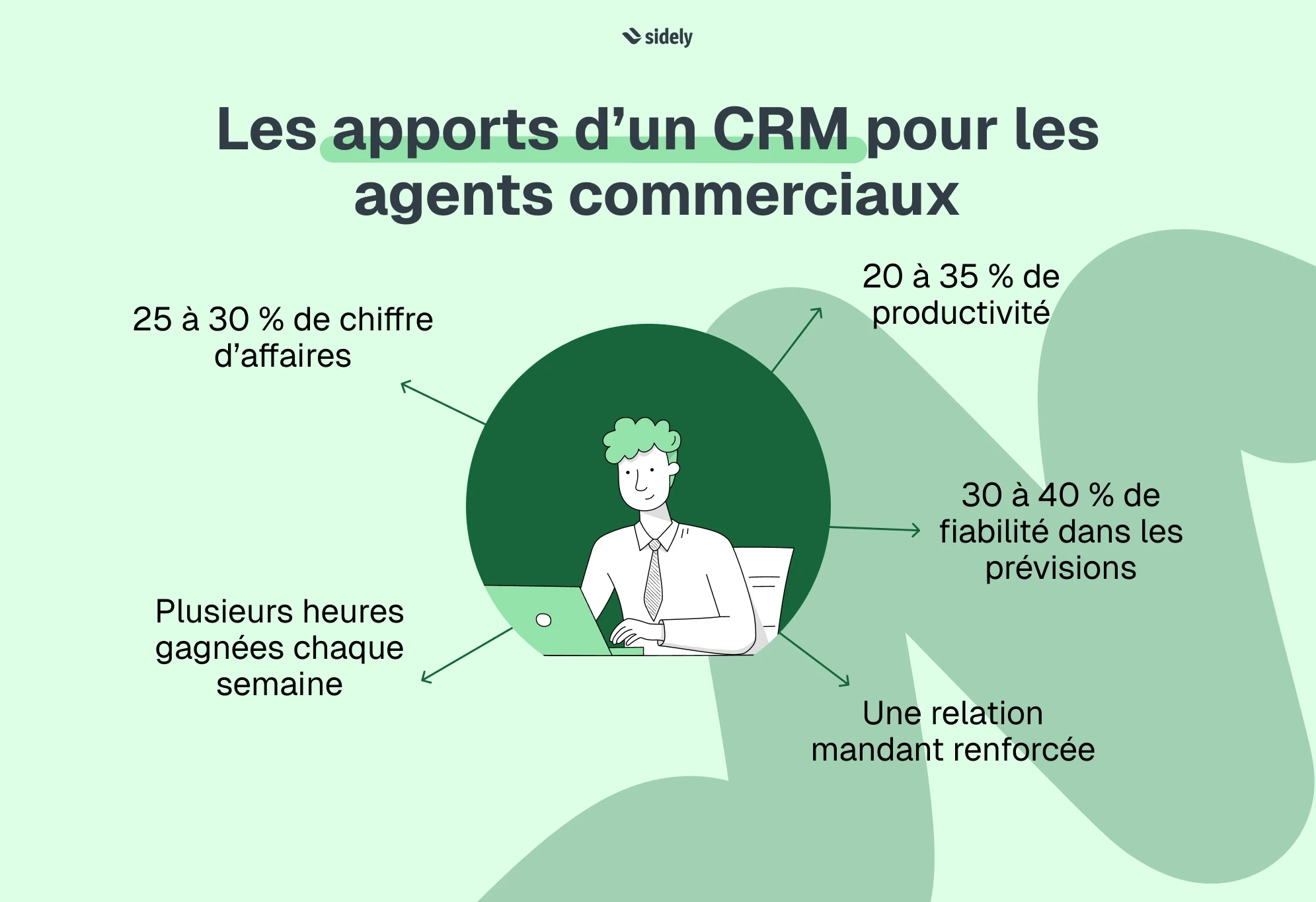
Adopting a CRM delivers concrete benefits: an increase in revenue (25-30%), productivity gains (5 to 8 hours per week), and better overall profitability.
The choice of software should prioritize field performance and mobile use over complex administrative functions, while verifying integration options with billing tools.
An independent sales representative runs an independent business, often with multiple mandates, and has a strong field presence. An independent sales rep does not work like a salaried salesperson. They manage their own portfolio, several principals, their routes, invoicing, client follow-up, and drive their revenue autonomously.
In this context, choosing a CRM for an independent sales representative is not a matter of simple organizational comfort. It is a structuring lever to save time, better track opportunities, and professionalize relationships with partners. A CRM for an independent sales rep must therefore meet very specific needs and be chosen based on field realities: mobility, autonomy, and multi-company management.
In this article, you will discover what a CRM for independent sales reps really is, the essential features, the selection criteria, and the concrete benefits for an independent professional; helping you identify the most suitable solution for your field business.
What is a CRM for an independent sales representative?
Definition of a CRM adapted for independent professionals
A CRM for independent sales representatives is a customer relationship management software designed for independent professionals who represent one or more companies.
Concretely, it is a tool that allows an independent sales rep to centralize all their commercial information and manage their field activity in a structured way.
The CRM (Customer Relationship Management) becomes a personal management tool here, rather than a tool imposed by a sales department.
Differences from a classic corporate CRM
A classic corporate sales CRM is designed for a structured sales team, with a manager, collective objectives, internal reporting, and collaboration among multiple users. It serves to manage a salaried sales force, with access levels, validations, and a hierarchical logic.
A CRM for an independent sales representative, on the other hand, is aimed at an independent professional. They work alone, sometimes for several principals, and must above all organize their field activity, track their commissions, and generate reports for different companies. The tool must therefore be simpler, more mobile, and focused on the autonomous management of their portfolio.
CRM needs differ because of both the structure and the sales organization. A CRM that is too complex or designed for large teams quickly becomes unsuitable for the daily life of an independent mobile rep. Their software must therefore be simple, mobile, and flexible.
Why is Excel not enough for a sales representative?
The short answer would be to say that Excel is not a CRM. But the truth is that many salespeople, even when equipped with a powerful CRM, often return to their spreadsheets. I think this goes beyond a tool comparison and is more about what a sales rep is looking for in them. When launching a business, Excel may suffice. But as soon as the client portfolio grows, principals multiply, and routes intensify, its limits become obvious because it simply prevents them from sustaining their business.
An Excel file allows data storage, but it does not create a true sales follow-up logic: as the business grows, the sales representative risks losing important and strategic elements due to a lack of a centralized and organized vision.
No follow-up management is automated. Everything relies on memory or manual reminders. Yet, an independent sales rep lives precisely by their ability to follow up at the right time, with the right message. Without an integrated alert or scheduling system, opportunities can easily be forgotten or poorly prioritized.
Furthermore, Excel is not suitable for field activity, while the sales representative profession is mobile by nature. Without tools designed to organize and track activity, it becomes difficult to concretely demonstrate actions to principals and sustain the commercial relationship.
Finally, multi-mandate management quickly becomes complex in Excel. When you represent multiple brands or suppliers, files multiply and the risk of errors increases.
Data security is also a major challenge. A simple spreadsheet guarantees neither advanced protection nor structured access control. Yet, your clients and principals expect rigorous and secure handling of their information. An inadequate tool can weaken your professional credibility.
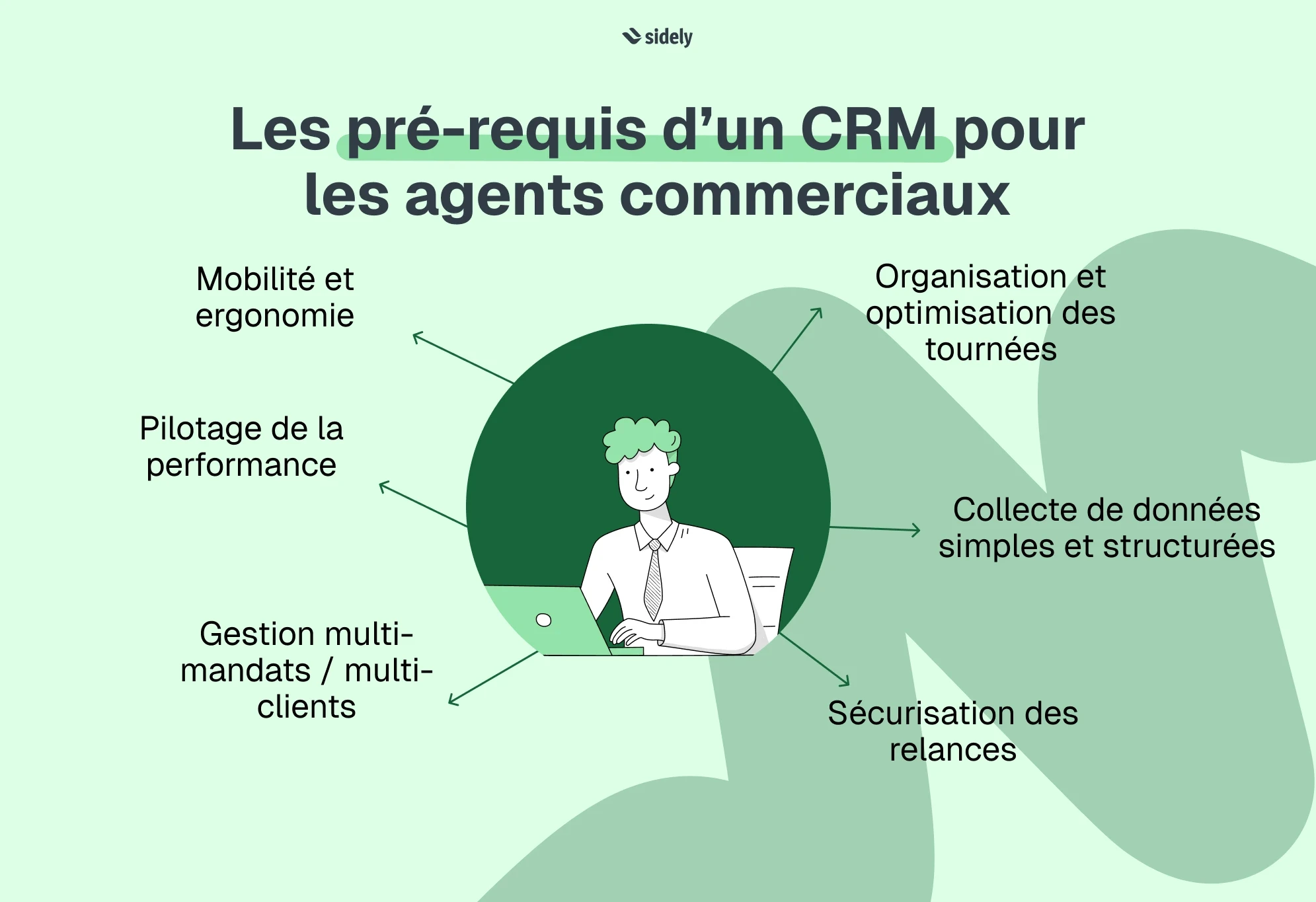
The essential features of a CRM for independent sales representatives
An independent sales rep faces a dual challenge. Their tool must help them, on one hand, effectively manage their core business—meaning sales and revenue growth. They must be able to track opportunities, send quotes, manage follow-ups, and analyze performance.
On the other hand, they must also be able to track and justify the actions requested by their principals: route management, visit reports, product listings tracking, activity reporting, and field feedback. These elements are not just about direct sales, but contribute to the quality of the commercial relationship.
An appropriate CRM thus makes it possible to reconcile these two dimensions: growing one's business while meeting the operational requirements of clients and partners.
Client and prospect management
Managing clients and prospects is the foundation of a CRM for independent sales representatives. The tool must allow centralizing and structuring all information related to each client account (contact details, contacts, history of exchanges, listed products, commercial conditions, associated documents, etc.).
This centralization provides a comprehensive and actionable view of the portfolio. It avoids data fragmentation and ensures rigorous follow-up, even as the number of clients grows. The commercial agent can thus prepare for meetings more effectively and professionalize their relationship with contacts.
Multi-mandate management
Multi-mandate management is a decisive feature for an independent sales representative. When representing several brands or suppliers, they must be able to clearly distinguish their portfolios and track activity by principal.
A suitable CRM makes it possible to isolate data by brand, analyze the corresponding revenue, and produce separate reports. This separation ensures a clear reading of performance and avoids any confusion between activities. It also reinforces the professional credibility of the representative, who can provide each partner with precise and structured tracking.
This is a key point rarely managed well by generalist tools.
Opportunity and sales pipeline management
A sales CRM for representatives must offer a clear view of ongoing business development. Tracking opportunities makes it possible to visualize the different stages of the sales cycle, estimate forecasted revenue, and identify high-potential deals.
The representation of the sales pipeline helps prioritize actions and anticipate future results. The representative thus has a dynamic view of their activity without having to perform complex manual calculations. This visibility strengthens management capability and secures portfolio growth, but above all, allows for better setup of automated follow-ups...
Task management and automated follow-ups
Sales performance relies heavily on the ability to follow up at the right time (and forget nothing), without depending solely on memory. A CRM for sales representatives must therefore integrate a task planning and automated reminder system.
The representative can schedule their follow-ups, organize their priorities, and visualize actions to be taken in an agenda synchronized with their calendar.
Sales route planning
The activity of a sales representative is deeply rooted in the field. An effective CRM must integrate a geographic dimension, with client mapping and smart visit planning.
The tool should make it possible to organize meetings by area to increase the number of appointments, optimize travel to reduce unnecessary routes, or manage overnight stays if necessary.
Geolocation and map visualization then become true levers of efficiency.
Goal and commission tracking
For an independent sales representative, mastering commissions is essential. A suitable CRM must allow setting up applicable rates, automatically calculating amounts associated with validated sales, and analyzing results by period or by principal.
Beyond providing immediate transparency on business profitability, it facilitates goal tracking and helps identify the most successful sectors or partners. The representative can thus adjust their sales strategy based on reliable and updated data.
Reporting and dashboards
A CRM for independent sales representatives must offer synthesized dashboards to track revenue by client, performance by geographic area, visit frequency, or the progress of objectives. They facilitate decision-making and help anticipate necessary adjustments. The representative no longer works on intuition, but on the basis of measurable indicators.
But for an independent agent, these indicators have a dual function. They must also be easily shareable with principals to justify actions taken.
Exportable and structured reporting allows demonstrating the work done concretely: number of visits, store tracking, open opportunities, and revenue growth. This transparency strengthens professional credibility and consolidates the commercial relationship.
The CRM thus becomes not only a management tool, but also a strategic communication medium with partners.
Essential mobile application
Finally, a CRM for sales representatives must be designed for mobile use. The representative spends most of their time traveling and must be able to access their data from their smartphone or tablet, even without a network connection.
Automatic synchronization of information ensures continuous work between the field and the office. The tool must also remain easy to learn, quick to configure, and customizable according to the activity sector.
An intuitive and mobile solution becomes a real daily assistant at the service of sales performance.
How to choose the right CRM when you are an independent sales representative?
Choosing the right CRM when you are an independent sales representative is not about selecting the most complete software on the market, but the one that truly corresponds to how you work, your organization, and your growth objectives.
Clarify your profile and organization
Before even comparing tools, ask yourself the right questions.
Do you work for a single principal or for several? Do you manage a stable portfolio or are you in an active prospecting phase? Do you work alone or as part of a network of representatives?
A multi-mandate representative won't have the same needs as a representative dedicated to a single brand. The ability to separate portfolios and produce distinct reports can become decisive. Your current organization therefore conditions the choice of CRM.
Evaluate ease of use
Sales representatives rarely have time for lengthy training. The sales CRM interface must be intuitive, quick to understand, and simple to configure. Check:
that the CRM is usable on smartphone and/or tablet;
that the CRM is compatible with the device you have (Windows, Android, iOS…);
that the CRM works even without an internet connection.
A good indicator is testing the solution in real conditions. Can you create a contact, schedule a visit, and log an opportunity in just a few minutes? If the setup is complex, adoption will be difficult over time and you will have invested in an unsustainable solution.
💡 The risk of all-in-one
A tool that claims to do everything (CRM, invoicing, quotes, accounting, full administrative management...) will not be your best ally. For an independent sales representative, the priority is field performance: visits, follow-ups, opportunities, commissions. An overly administrative tool can slow down adoption.
The most relevant logic for an independent sales rep is to position the CRM as the sales pilot center, the main field management tool, and the single source of client data.
Then, offer seamless integrations with invoicing tools or quoting software, accounting solutions, principals' ERPs...
This allows you:
- To keep a simple and powerful CRM
- To avoid double data entry
- To secure data flows
- To adapt the ecosystem to each representative's needs
Check compatibility with your business
When choosing a CRM, integrations become a central criterion. A powerful CRM shouldn't do everything, but it must connect easily to your existing tools, particularly for invoicing, accounting, or document management.
This technical aspect quickly becomes strategic as your business grows. This validates that you have chosen a CRM that can grow with you over time.
Compare costs and business models
As a representative, when you choose your CRM, price should not be analyzed in isolation. Rather than "how much does it cost?", ask yourself "how much does it earn me or save me?". If the tool allows you to sign even just one extra deal per month or saves you several administrative hours per week, the investment is quickly recouped.
What are the prices of a CRM for independent sales representatives?
In the market, CRMs generally operate on a monthly subscription basis.
For an independent sales representative, rates are on average:
Between $15 and $30 per month for basic solutions
Between $30 and $60 per month for more complete and mobile CRMs
Above $60 per month for highly specialized or customizable solutions
Most tools offer monthly or annual payments, with a discount for a one-year commitment.
It is important to check if the advertised price includes all essential features, notably the mobile version, dashboards, exports, or integrations.
What hidden fees should you watch out for?
Some costs are not always visible at first glance:
Installation or setup fees
Paid add-ons for certain advanced features
Cost of integrations with other software
Premium support billed as an extra
Long contract commitment with termination penalties
It is also wise to check if the price scales based on data volume, number of contacts, or enabled features.
💡 Should you include the cost of the CRM in your rates?
For an independent sales representative, the CRM is a work tool, much like a vehicle, a phone, or a computer. It is part of professional business expenses.
You can integrate it indirectly into your business model, meaning in the overall calculation of your profitability and commissions. However, it is rarely relevant to bill it explicitly to your clients.
In some specific cases, particularly if a principal requires the use of a specific tool or detailed reporting, the cost can be negotiated or integrated into contract terms. But this remains a special case.
What type of CRM to choose?
The dominant model is SaaS, meaning a monthly or annual subscription without a major initial investment. You pay for access to the software, hosted in the cloud, which generally includes updates and maintenance.
You can also choose to work with open-source CRM software, even though the latter is generally more complex to master.
In both cases, this type of sales CRM smooths out expenses and avoids heavy investments like those associated with locally installed software.
CRM for independent sales representatives: what are the concrete benefits?
We end this article by presenting the main advantages and benefits of a CRM for an independent sales representative. This will give you all the elements needed to make your decision.
Increased revenue
Companies and salespeople equipped with a CRM see on average:
+ 25 to + 30 % increase in revenue
+ 20 to + 30 % improvement in conversion rate
Why? Because opportunities are followed up, reminders are scheduled, and prospects are no longer forgotten.
For an independent sales representative, this concretely means securing more sales and reducing business loss linked to oversights.
Productivity improvement
A CRM automates repetitive administrative tasks, hence saving time: on average, +25%. For a field representative, this can represent 5 to 8 hours saved per week, which is almost an extra work day recovered for prospecting or meetings.
Better follow-up management
In B2B, nearly 60% of sales require at least 5 follow-ups, yet the majority of salespeople give up after 2 or 3 attempts.
A CRM structures follow-up and thus helps push past those initial attempts. Opportunities are not (or are less) forgotten, follow-ups are more regular, and the pipeline is therefore more reliable.
Optimization of routes and field time
Field sales reps spend on average 30% of their time traveling. A CRM that integrates geographic planning can increase the database of daily appointments and thus improve visit frequency for strategic clients.
Even a modest gain of 1 extra meeting per day can represent a significant increase in annual revenue.
Better profitability management
Thanks to commission tracking and analysis by principal:
The representative identifies the most profitable clients
They can reallocate their time to the most successful sectors
They adjust their strategy based on factual data
A simple portfolio adjustment can generate 5 to 15 % extra profitability.
Comparison of CRM solutions for independent sales representatives
Here are the main criteria to analyze during your comparison:
Criterion | Generalist CRM | Agent-specialized CRM | Field mobile CRM |
|---|---|---|---|
Multi-mandate | Limited | Yes | Yes |
Mobile application | Variable | Yes | Optimized |
Commission tracking | Rare | Yes | Configurable |
Route optimization | Rare | No | Yes |
Ease of use | Variable | Medium | High |
The choice will depend on your priority: pure administrative management or field performance.
Choosing a CRM for an independent sales representative is about structuring your independent business, improving sales efficiency, and strengthening relationships with your principals.
A good CRM software for independent sales reps must be mobile, simple, adapted to multi-mandates, and performance-oriented. It should save you time, secure your follow-ups, and offer clear visibility on your revenue and commissions.
In a competitive environment, responsiveness becomes a decisive advantage. The sales representative who relies on reliable data makes better decisions and grows their portfolio with greater peace of mind.
Angela heads up Customer Success at Sidely. She leads her team with an approach that is both highly human-centric and deeply product-oriented. This dual perspective—understanding customer needs while mastering how technology solves them—allows her to see what others miss. She supports sales teams by experiencing their daily challenges alongside them.
See also

Artificial intelligence and field professions: what our 2026 studies reveal
Adoption, barriers, use cases: discover what our three studies reveal about the role of AI among sector managers, sales representatives, and foodservice sales reps.

CHR and RHF Sales Representatives: portrait of a relationship-driven profession in the era of data
Equipment, productivity, AI: discover the major trends for the HORECA and food service sales profession in 2026 through our field study.

Pharmaceutical Sales Representative in France: Portrait of a Field Job Under Pressure
Compensation, aspirations, AI usage: discover the major trends in the pharmaceutical sales representative profession in 2026 through our field study.

Area Sales Managers in France: who are they and how is the profession evolving in 2026?
Compensation, aspirations, AI usage: discover the major trends in the field sales representative profession in 2026 through our field study.
The area manager professions in 2026
Discover the trends, the challenges, and the key figures.