

How can an outside sales representative optimize their schedule?
Optimize your sales schedule: sales planning, schedule management, route planning, visit prioritization, and mobile CRM to save time.

In short
9 min read
Define concrete goals per week (securing, development, reactivation) to structure your commercial planning.
Block fixed, non-negotiable slots in your calendar for preparation, entering reports, and prospecting.
Prioritize your visits according to a simple matrix of value and urgency to identify priorities to deal with first.
Group your visits geographically by area to optimize your tours and drastically reduce the time spent on the road.
Plan only 80% of your actual capacity to keep a necessary safety margin for unexpected field events.
Adopt simple routines: a preparation review on Friday and a quick 7-minute check every morning.
As a field sales representative, time is your scarcest resource. That is why optimizing your schedule is crucial.
Getting better organized does not only mean saving time, but also better covering your territory and selling more, while reducing decision-making and organizational fatigue at the end of the day. Unlike a desk-bound sales representative, a large portion of your day is absorbed by travel, unexpected events, and logistical coordination, which is highly exhausting.
Optimizing your sales schedule therefore means implementing a simple method: prioritizing visits, structuring sales planning around concrete goals, and equipping your schedule management to handle unexpected events without losing track.
In this article, you will find actionable tips to organize a sales route, reduce downtime, and better sequence your appointments. We will also see how a mobile CRM designed for the field can streamline your organization during a sales route.
Lay the foundations of a sales planning process that works in the field
A poorly planned hour costs business opportunities. Indeed, an unoptimized schedule leads to empty slots after a cancellation, useless trips between two distant visits, or low-priority appointments placed at the wrong times. This results in fewer high-value visits, less face-to-face time with the customer, and a direct drop in revenue.
That is why you must lay the foundations of a structured sales planning process to optimize your schedule management.
Define goals by the day or week
A full schedule does not necessarily mean an effective schedule. Before "squeezing in" your appointments, start with a concrete goal: develop, secure, or reactivate. For example:
Week 1: Securing key accounts (high-stakes visits, risk of loss).
Week 2: Development (prospects, new listings).
Week 3: Reactivation (dormant clients, follow-ups).
This prioritization logic based on goals makes sales planning more coherent.
Block non-negotiable time slots (and protect them)
To optimize your sales schedule, set aside fixed blocks:
Preparation (15 to 30 min): goals, customer context, offers, negotiation points.
Entry / report (5 to 10 min after the visit): while it is still fresh.
Prospecting / follow-ups (30 to 60 min): ideally at the start of the day or between two zones.
If you do not block these slots, urgent tasks will consume them.
Use daily, weekly, and monthly views to stay organized
The daily view is used to execute your schedule.
The weekly view is used to balance your schedule.
The monthly view is used to manage your schedule.
By managing your schedule this way, you can smooth out the workload, avoid overloaded weeks, and guarantee a visit frequency consistent with your sales goals.
Prioritize your visits: the simple method that changes everything
Classify each visit by value and urgency
To prioritize, use a quick grid (30 seconds per account):
Value: Revenue, potential, strategic importance, seasonality.
Urgency: Backorder, dispute, imminent promotional campaign, active competition.
This gives you 4 categories:
High value + high urgency: plan first
High value + low urgency: protect in the schedule (otherwise it gets pushed back)
Low value + high urgency: handle quickly, but without sacrificing your route
Low value + low urgency: group together or switch to a phone call
You can then classify them into dynamic view lists in your CRM. This allows you to segment your points of sale based on these 4 main criteria and create segments tailored to your sales priorities.
Turn "small visits" into optimized sequences
Instead of scattering 6 low-stakes visits over 3 days, we advise you to opt for a sequence logic:
a half-day dedicated to one area,
visits grouped geographically,
an order that minimizes detours.
This is where sales route organization makes a difference: the same volume of visits can cost 20% less time if the order is optimized.
Voluntarily limit the number of "realistic" visits
Do not overestimate yourself. Ultimately, this will create more stress and frustration than beneficial results. Wanting to make 8 visits a day only makes sense if the travel times are short, durations are kept under control, and you have built in some margin.
The road time of field sales representatives is often underestimated, or even ignored.
An operational rule: plan for 80% of your capacity, keep 20% for the unexpected (delays, cancellations, opportunities). This is one of the best practices for schedule management among field teams.
Organize a sales route without wasting time on travel
More than just a schedule, we are talking here about route optimization. But this is highly important.
Work by zones, not by isolated opportunities
To organize a sales route, the "client by client" approach is less effective than the "zone by zone" approach. In concrete terms:
group your visits by sector (neighborhoods, cities, routes),
associate each zone with a half-day or a full day,
avoid back-and-forth travel between two distant hubs.
For this, you can use your route planner and optimizer. Options with integrated AI also allow this to be done automatically or semi-automatically.
Use mapping to validate your order of visits
A route "on paper" can be inefficient on the road. The ideal method is to visualize the points of sale on a map, then adjust the order, times, and constraints (parking, off-peak hours, access).
In Sidely, the map display and optimization option allow the itinerary to be recalculated, especially after adding an event or changing a constraint, to keep a consistent route.
Incorporate unexpected events without breaking the day
A canceled visit should not leave a 90-minute gap. Prepare a "Plan B":
a list of nearby clients who can be "visited on the fly,"
quick tasks (merchandising, taking orders, inventory checks),
a slot for follow-ups.
Then readjust your route directly from your CRM's mobile or tablet application: the change is saved, the route is re-optimized, and you avoid unnecessary detours.
Save time with the right tools: schedule, mobile CRM, automations
We have just shared various advice and actions to better manage your schedule. None of them are possible without the right tools.
Centralize your schedule + your visits + your tasks in one single place
The main source of wasted time is dispersion: calendar on one side, notes on another, customer info elsewhere. A mobile field calendar must allow you to:
plan a visit or a task in one click,
add events or actions to your schedule,
re-optimize your route if necessary,
associate the event with a company / point of sale,
clearly visualize the day (list and calendar),
intelligently filter your views and tasks to focus on the essentials.
Use visual codes to drive execution
A good sales schedule must immediately indicate what is planned, what is completed, and what remains. The best way to see this at a glance is to implement color codes. They allow you to track the status of events quickly (planned, completed), which improves execution discipline and prevents forgotten reports at the end of the week.
Launch your routes from the schedule
When you have to copy-paste an address, open another app, and search for the location, you lose time… and energy.
Launch the route to a point of sale via your preferred GPS (Waze, Google Maps, Citymapper, etc.) directly from your CRM schedule. This micro-optimization repeated 6 times a day becomes a real weekly gain.
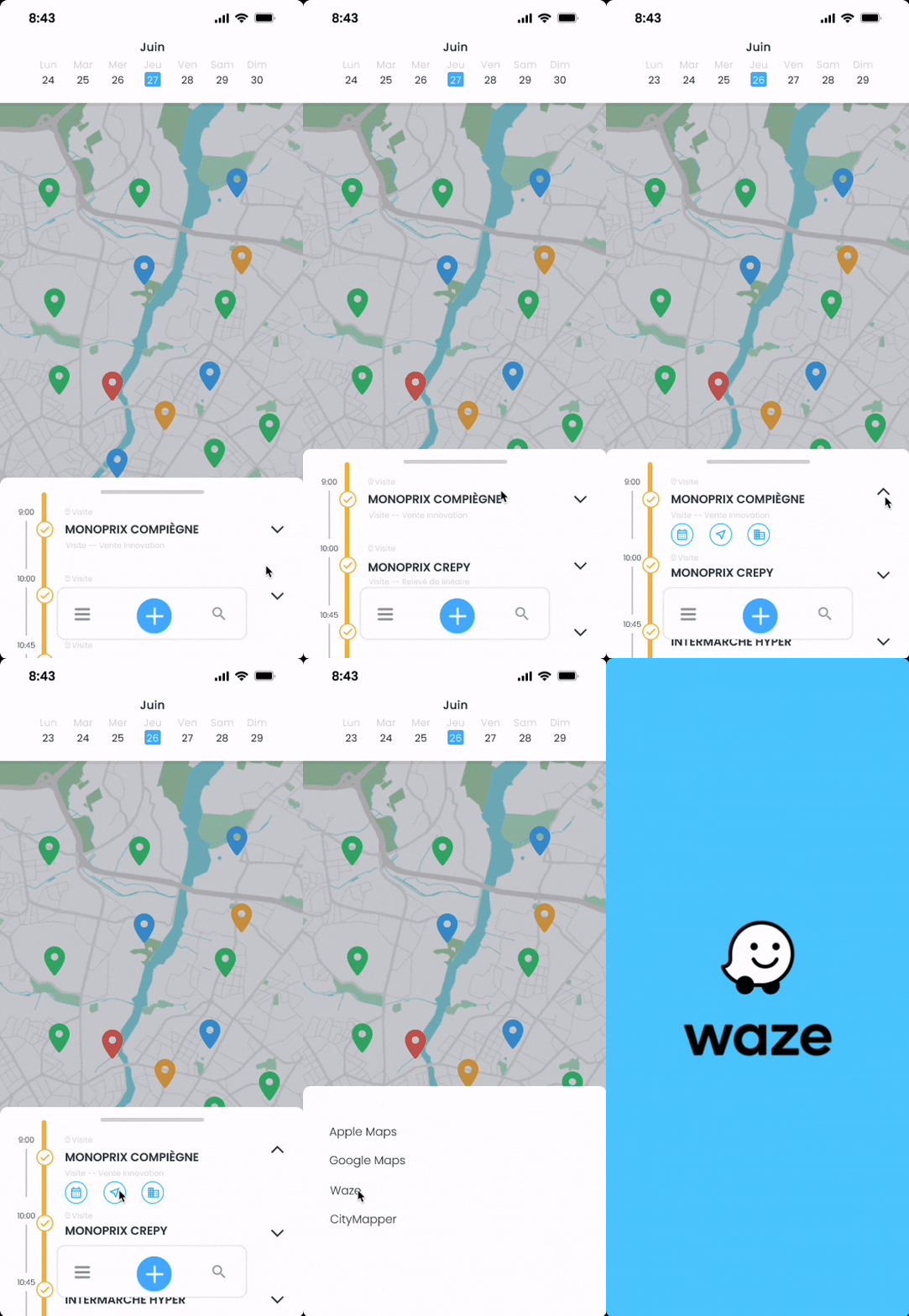
Example of accessing the Waze application from the Sidely mobile calendar
Synchronize your CRM with your calendar (Google, Outlook…)
If you use Google Calendar or Outlook Calendar as your main calendar, synchronization avoids having to manage two parallel schedules.
You should therefore integrate your calendar with your CRM in a one-way synchronization to maintain a single view of your week, especially if you mix internal meetings with field visits. This avoids duplicates and keeps a sales schedule always up to date.
As a result, everything created in your CRM appears in your external calendar and vice-versa.
Set up a weekly routine that makes your schedule "chaos-proof"
The Friday review: prepare the following week in 30 minutes
Block out 30 minutes every Friday to:
check your goals,
distribute your zones,
schedule your priority visits,
plan margins.
This is the most profitable routine to stabilize your organization.
The daily review: 7 minutes, no more
Every morning (or the night before):
validate the order of visits,
identify the "high-stakes" appointment of the day,
prepare your Plan B (in case of cancellation).
This mini-routine prevents you from letting the day control you.
The golden rule: close out every visit immediately
The "write report later" often becomes "never" or "from memory." Ideally, finalize your actions and tasks during or right after the visit. This keeps your schedule clean, ensures clear execution, and relieves you of unnecessary mental load.
Optimizing your schedule as a field sales rep comes down to combining three levers: goal-oriented sales planning, strict prioritization of visits, and sales route organization built around geographic zones to limit travel. In practice, it is often small rules that make a big difference: safety-proofing preparation slots, planning at 80% to absorb the unexpected, grouping visits by sector, and closing out each appointment while the information is still fresh.
Schedule management becomes even more efficient when the tool matches the pace of the field. A mobile CRM with an integrated schedule accelerates execution and improves coverage.
Margot has been working in Tech and SaaS for 8 years, with a multi-product experience that has given her a unique understanding of business challenges. On a daily basis, she analyzes, relentlessly tests, and relies on facts to shed light on market trends and help sales teams move forward.
See also

Artificial intelligence and field professions: what our 2026 studies reveal
Adoption, barriers, use cases: discover what our three studies reveal about the role of AI among sector managers, sales representatives, and foodservice sales reps.

CHR and RHF Sales Representatives: portrait of a relationship-driven profession in the era of data
Equipment, productivity, AI: discover the major trends for the HORECA and food service sales profession in 2026 through our field study.

Pharmaceutical Sales Representative in France: Portrait of a Field Job Under Pressure
Compensation, aspirations, AI usage: discover the major trends in the pharmaceutical sales representative profession in 2026 through our field study.

Area Sales Managers in France: who are they and how is the profession evolving in 2026?
Compensation, aspirations, AI usage: discover the major trends in the field sales representative profession in 2026 through our field study.
The area manager professions in 2026
Discover the trends, the challenges, and the key figures.