

Mobile application for the sales force: key uses, benefits, and selection criteria
Visit reports in just 2 clicks, shelf photos, available stock, offline access… Which features should you actually look for? We separate what really matters from what just looks good in sales slides.

In short
12 min read
The mobile application must be native and designed specifically for the field, rather than just a scaled-down extension of a desktop CRM.
It facilitates route planning by centralizing customer information and enabling a dynamic calendar with integrated geolocation.
Data entry in the field (reports, orders, photos) must be fluid, intuitive, and possible offline to guarantee the reliability of information.
A well-adapted application saves significant administrative time, while ensuring better information quality for managerial oversight.
Complementarity with a web interface is essential for in-depth work, performance analysis, and coordination with headquarters.
The choice of tool must prioritize scalability and ergonomics, in order to avoid rigidifying processes and to ensure genuine adoption by the teams.
In most sales organizations, the field sales force spends the bulk of its time outside the office. It is estimated that nearly 80% of a mobile sales representative's activity takes place in the field. Yet, a large portion of sales tools remain designed for sedentary use on a computer, within an administrative context.
Mobile exists, but it is often thought of as a simple extension of the desktop CRM, with reduced features or poor ergonomics. Under these conditions, the mobile application for the sales force becomes a degraded access point to the central tool, rather than a real support for field action.
This creates tools that are powerful on paper, but rarely used in reality, leading to low adoption, delayed data entry (sometimes in the evening or on weekends), and incomplete or even unreliable field information. The problem is therefore not the lack of mobile tools, but the mismatch between real field practices and the tools provided.
This article intentionally starts from the concrete practices of field teams. It first identifies what is truly useful during a sales visit, then the tangible benefits for teams and management, before detailing the selection criteria for a mobile application for the sales force that is actually used, without weighing down the sales processes.
Key Uses of a Mobile Application for the Sales Force
An effective mobile application for the sales force supports the actual cycle of the field visit: before the visit, during execution on site, and after, when the information must become actionable.
Efficiently Prepare for Sales Visits
A mobile sales rep often manages between 50 and 150 active accounts, sometimes spread across multiple geographic areas. Without a suitable mobile application, visit preparation still largely relies on personal notes, email exchanges, Excel files or, in the best-case scenario, on the sales rep's memory.
Why are we talking about visit preparation here? Because it is a loop of information that jumps between mobile use and web use. The majority of our users organize, optimize, and prepare their routes on the web application for greater fluidity. However, to do this, they need data that is uploaded from the field. This data is reliable because reports and summaries are entered from an application built for field use (automatic synchronization, offline mode, voice dictation, etc.).
Furthermore, the mobile application makes it much easier to recall the key points of a meeting or a point of sale, and to check the actions taken during the last visit. A native mobile and tablet application also allows sending important push notifications, such as promotional campaigns currently running at the specified store or scheduled maintenance at the specified site.
This is not possible with a web application running on a smartphone. This is where non-native applications make visit preparation difficult and thus increase the risk of oversight or gaps between sales priorities and field reality.
Key Uses
A mobile application for the sales force provides access, before starting the route, to all useful information about points of sale:
history of visits and exchanges,
goals to achieve,
ongoing actions and commitments made,
performance data and specific alerts,
key contacts and field constraints.
The sales rep directly accesses their calendar and can consult their daily (or even weekly or monthly) schedule and the points of sale they need to visit.
The value of a mobile calendar is the ability to add an action immediately. Whether it is a visit to schedule, a task to complete, or a call to make, everything can be entered on the spot, without breaking the rhythm of the route.
This visibility also facilitates booking appointments, since the sales rep can view their availability directly from their mobile device. At the end of a visit, the sales rep can check their open slots and naturally conclude: "I'll be back on the 16th at 7:00 AM, just like today, does that work for you? I'll book it and send you the invite." An appointment set before leaving the point of sale is much more likely to be kept than a vague agreement like "we'll call each other to reschedule."
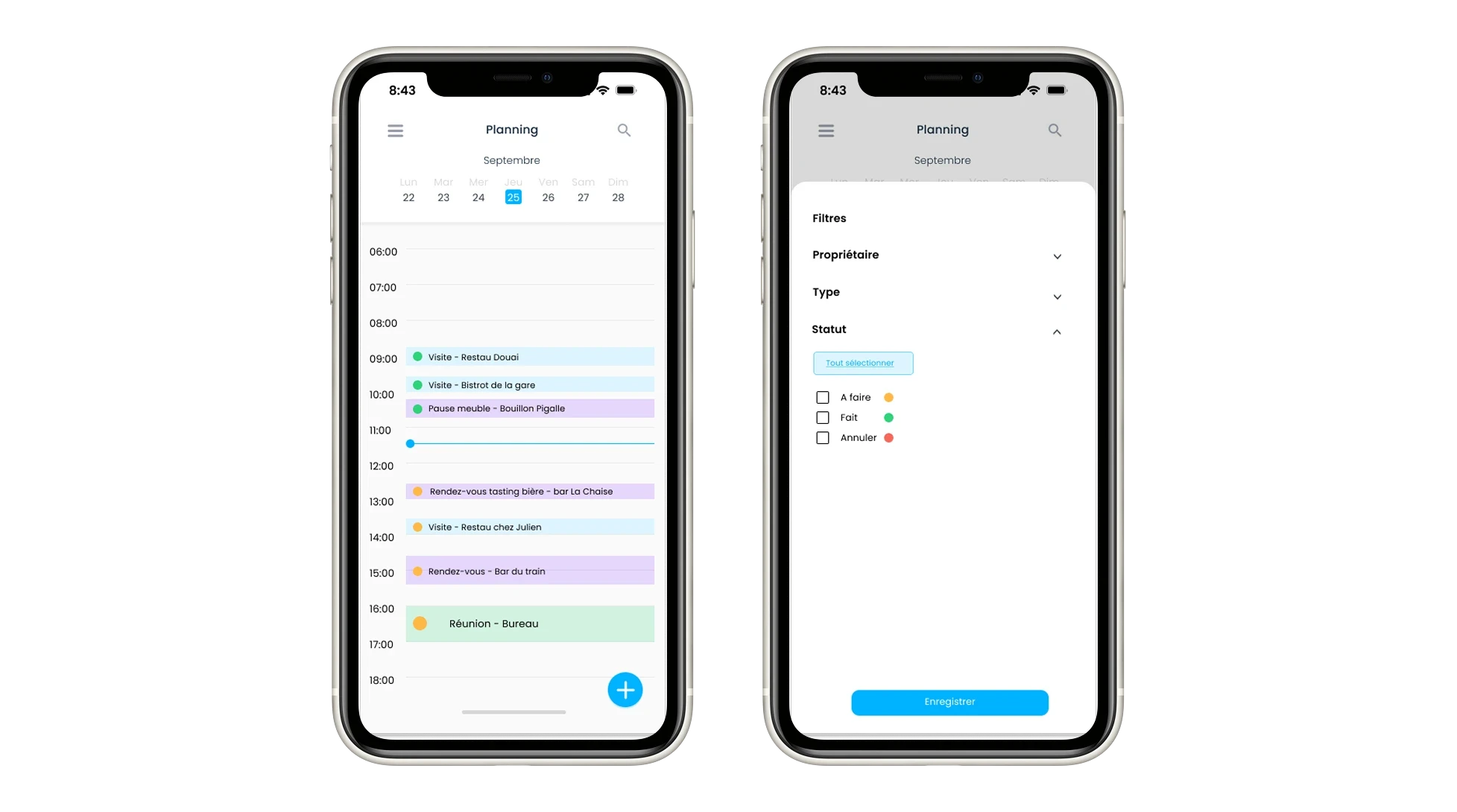
Sales calendar on mobile application
The mobile application also facilitates mobility, or more concretely, saves time daily. The sales rep opens their application, selects their next appointment, and launches GPS navigation directly from the CRM. This prevents juggling back and forth between multiple tools.
In case of cancellations or unexpected events, the sales rep can re-optimize their route directly from the mobile and tablet application. This adaptability makes life easier for the sales rep in the field, where unexpected changes are part of daily life.
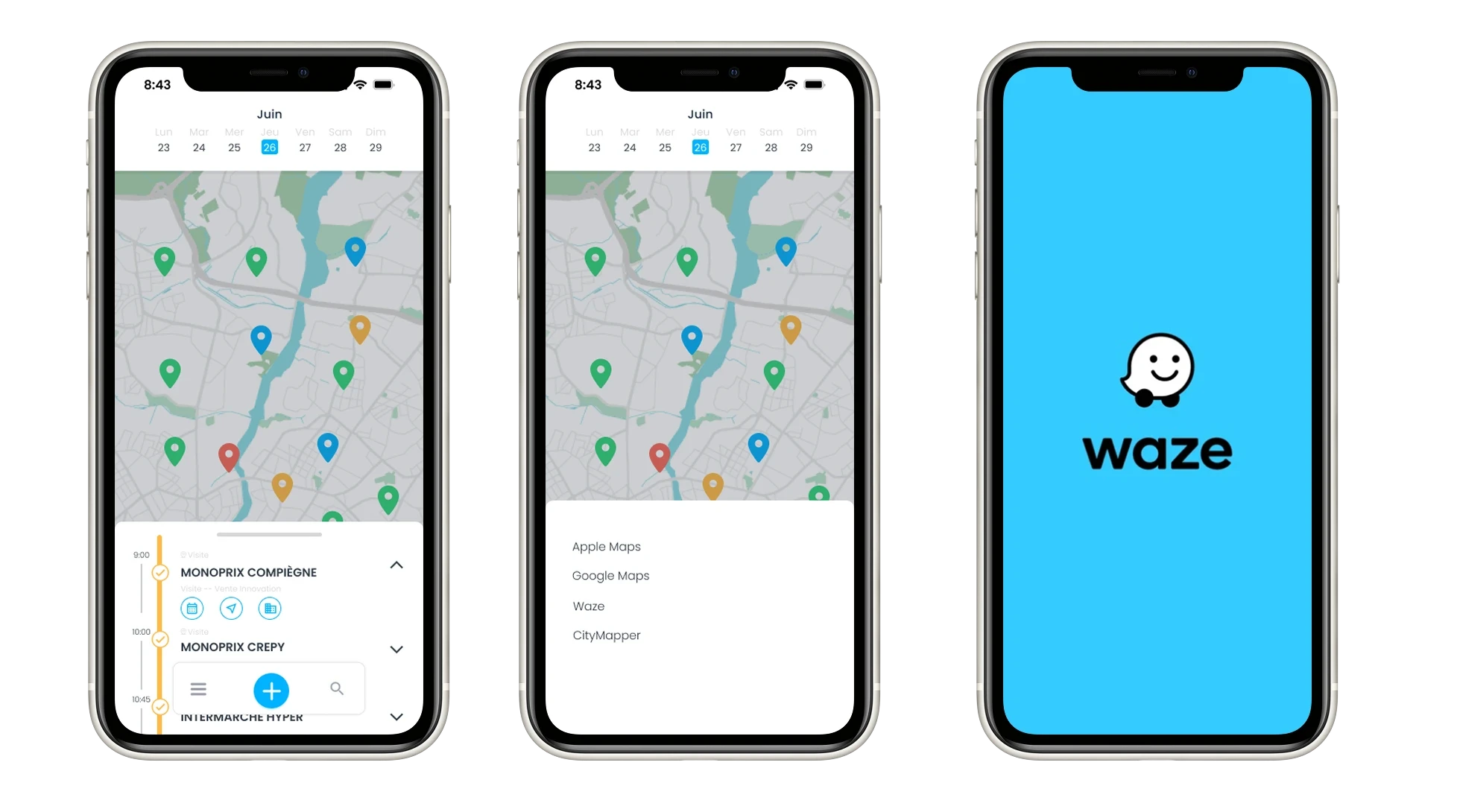
Direct access to mobility applications from the CRM
Another concrete mobile use case is that sales reps use the application just like they use their own phone every day. When the application is well-designed, getting started is intuitive and good habits are quickly formed.
The sales rep can thus call a contact, send an SMS, an email, or a WhatsApp message directly from the application without switching tools. Everything is done in the continuity of the visit and the client context.
The CRM then fully plays its role. It becomes a centralized and actively used database.
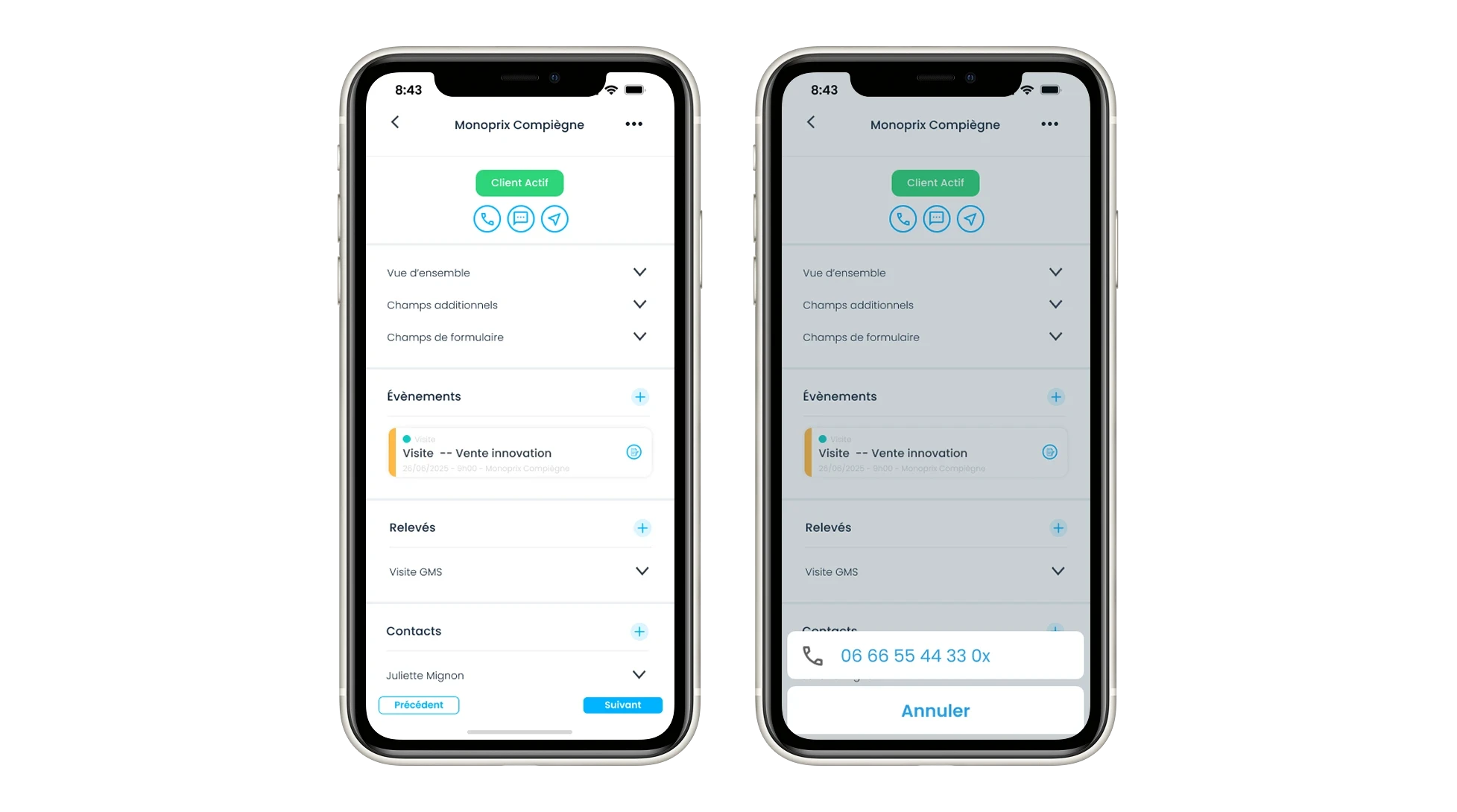
Calling and sending emails and SMS directly from the CRM
Visualizing priorities, visit goals, and checkpoints allows the sales rep to arrive on site with a precise view of the situation. The value lies not in the quantity of data stored, but in its accessibility and prioritization at the right moment.
The sales rep can thus prepare their assessment ahead of time, with goals already defined before the visit. Once on site, the assessment is automatically generated based on the selected targets.
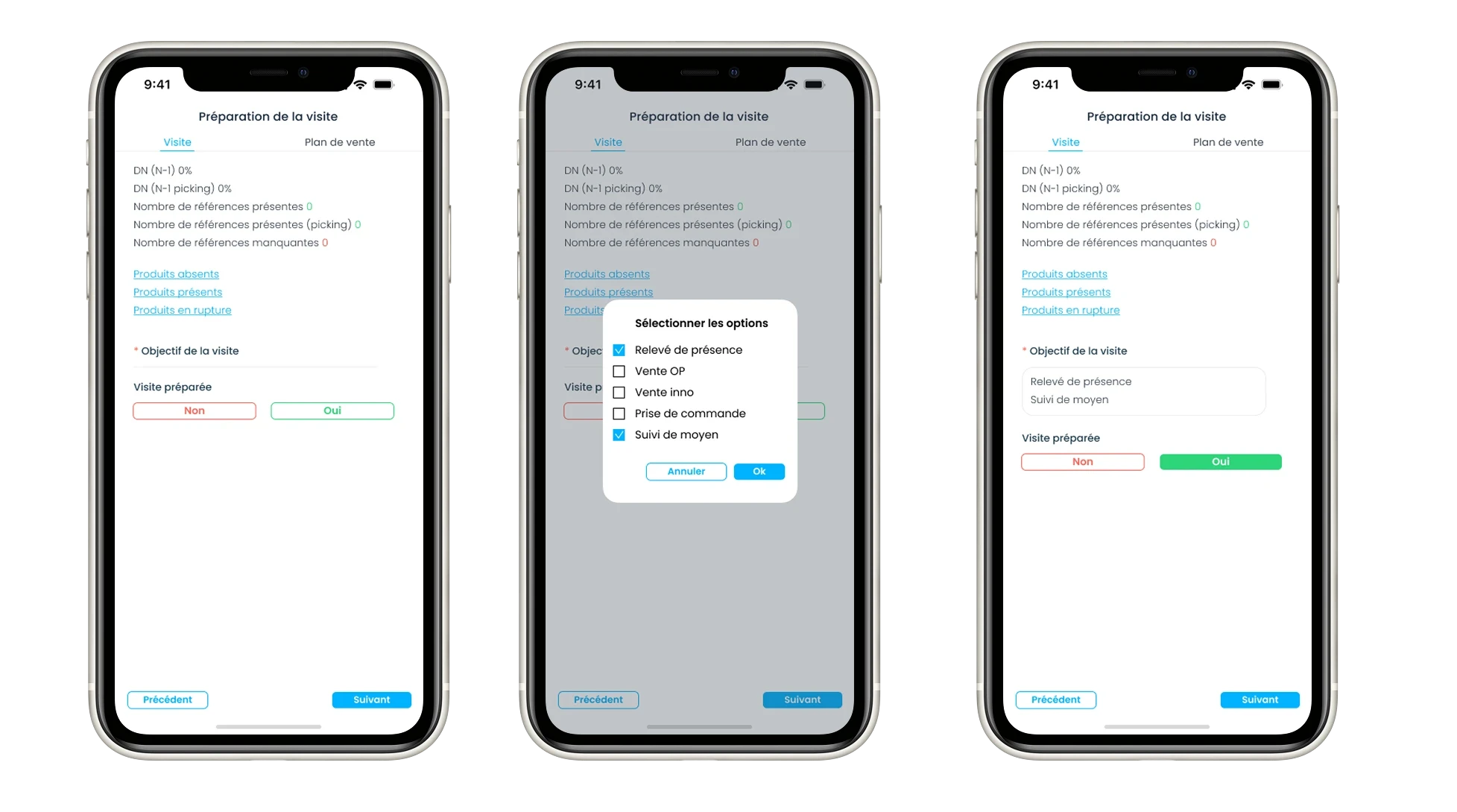
Preparing the assessment with goals
Executing Visits in the Field
Time spent with a client is often limited, typically between 30 and 60 minutes. In this context, any administrative entry is perceived as a constraint, rarely as added value. If the tool is not perfectly adapted to the field, it is bypassed or minimally used.
Additionally, a mobile application for the sales force allows for a significant reduction in administrative time, often estimated between 20% and 30%. Fewer tools, less manual reentry, and less distraction mean more time dedicated to preparation and interaction with the client.
Key Uses
In my eyes, it is during this phase that the mobile or tablet application brings the most value. It structures the field action and facilitates operational execution. Its primary role is to ensure that the data entered is complete and reliable.
When this condition is met, everything that follows naturally improves. Analytics are more relevant, decisions are more accurate, future routes are better prepared, and the sales relationship is strengthened. This is only possible if the application is truly designed for entering information in the field during assessments. The further the data is captured from the field, the more it loses in precision and reliability.
With that in mind, we designed an interface that evolves to improve the assessment experience and simplify the daily routine of sales teams, regardless of the device used. A grid mode is notably available, which is particularly suitable for tablets. It allows assessments to be displayed in a grid format to get a clear overview of the information to collect. All fields are visible at a single glance, which makes filling them out easier and helps structure field data entry efficiently.
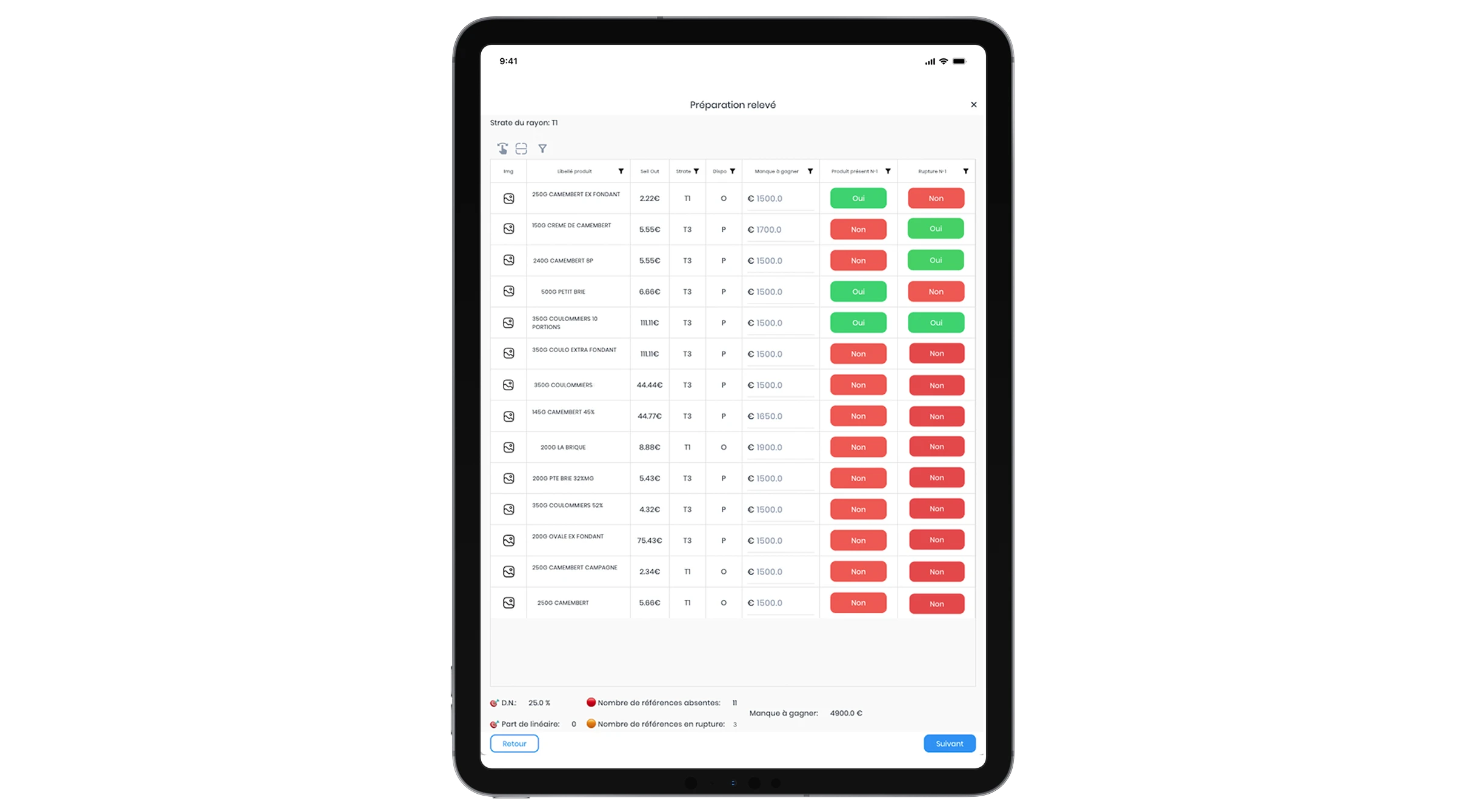
Example of a shelf presence assessment on tablet
We also designed a swipe mode, optimized for mobile use. It allows product assessments to be completed faster thanks to a smooth navigation. The sales rep swipes from one product to the next with a simple flick of the finger, without having to return to the list. In meetings, this workflow represents a real timesaver.
This is precisely the goal for Sidely users: to save time for field teams without sacrificing the quality of data entry. For this, mobile phones and tablets are the most suitable devices. Voice dictation turns speech into text, photo capturing is native and integrated into a timestamped library directly linked to the point of sale and the assessment, and the assessments are designed to be filled out instinctively.
All of these features contribute to faster, more complete, and more reliable data entry. Finally, when documents need to be approved by the main contact, such as a sales plan, mobile also simplifies the process. Approval is done directly on site, in the continuity of the visit.
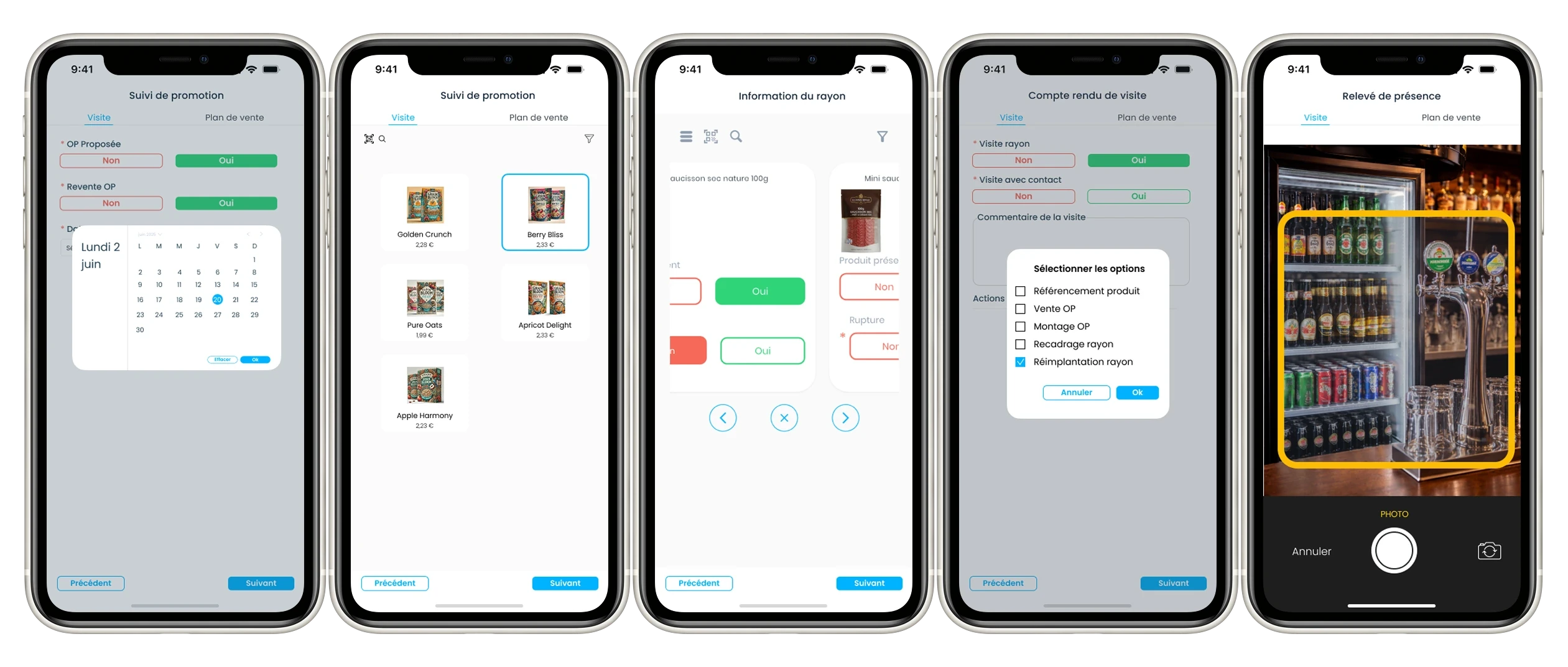
Example of a complete supermarket visit assessment
When speaking of data entry quality, order taking is one of the most critical challenges.
Order taking directly on a mobile device has the advantage of being immediate and integrating naturally into the conversation with the client. The sales rep creates the order on site, without breaking the context or needing later reentry. From the mobile application, they can manage all necessary components. Delivery information is filled out, products are selected, prices are adjusted, and discounts are applied according to the current rules. Validation can be completed directly using the client's electronic signature. Once the order is confirmed, the custom purchase order is automatically sent to the client and internal teams.
The application also allows sharing key documents in one click, whether they are purchase orders, sales plans, or service requests. A simple link is enough to send them through the most appropriate channel, such as email, SMS, WhatsApp, or Teams, without attachments or manual data reentry.
This approach streamlines collaboration with sales administration, technicians, or partners. Documents are always up to date, ready to be completed, and immediately actionable. Errors are minimized, back-and-forth communication is reduced, and the continuity between the field and the back office is strengthened.
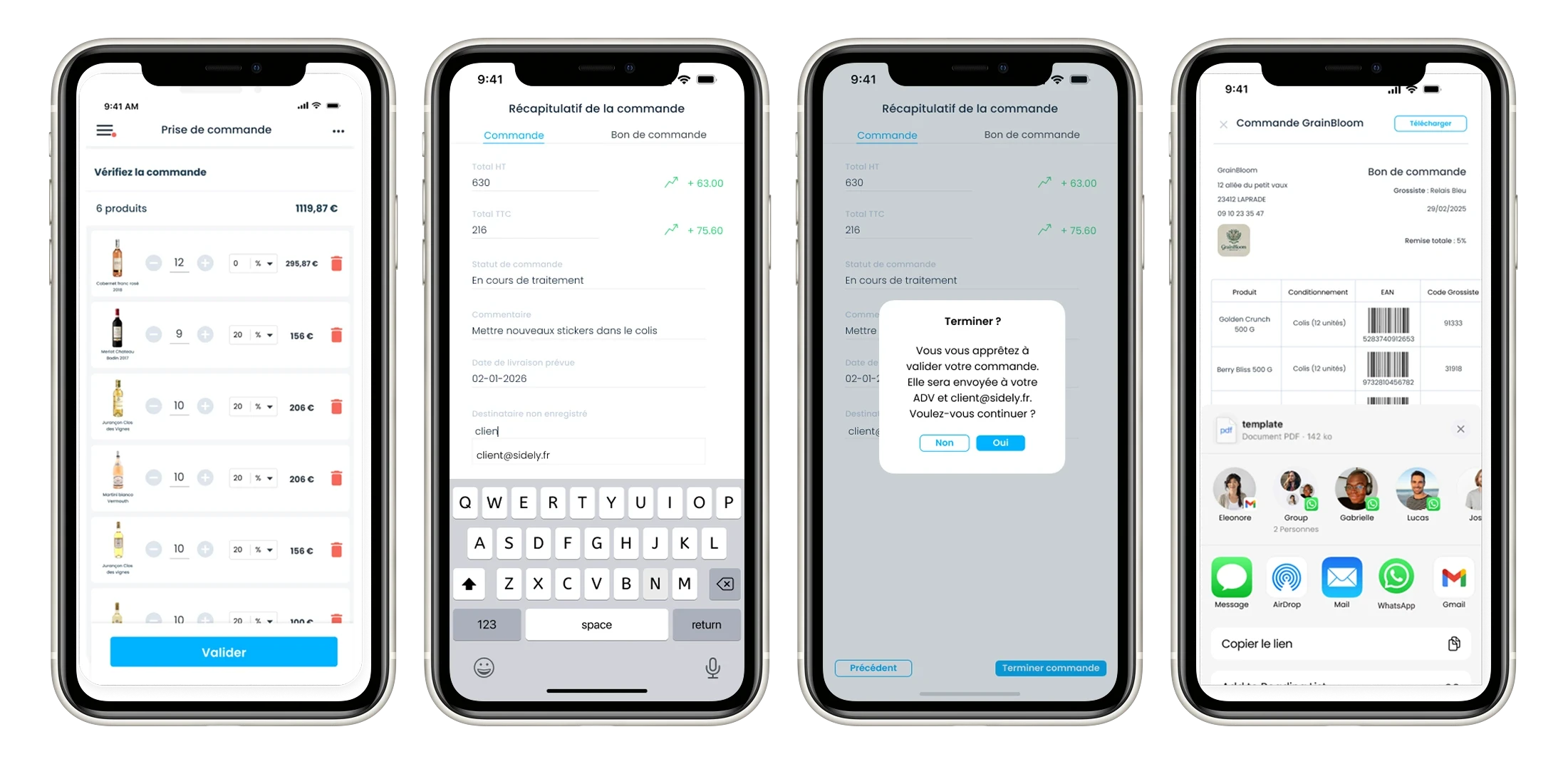
Example of mobile order taking with Sidely
An application also allows working on the go, even offline. Data is captured in the field and then synchronized automatically as soon as a network is available.
Capitalizing After the Visit
In many sales organizations, capitalizing on visits still relies on delayed reentry, often in the evening, with inconsistent, incomplete reports that are difficult for management to use.
Key Uses
A mobile application for the sales force ensures automatic centralization of data captured in the field. The visit report is generated directly during the visit, using guided fields, pre-filled data, and sometimes voice dictation.
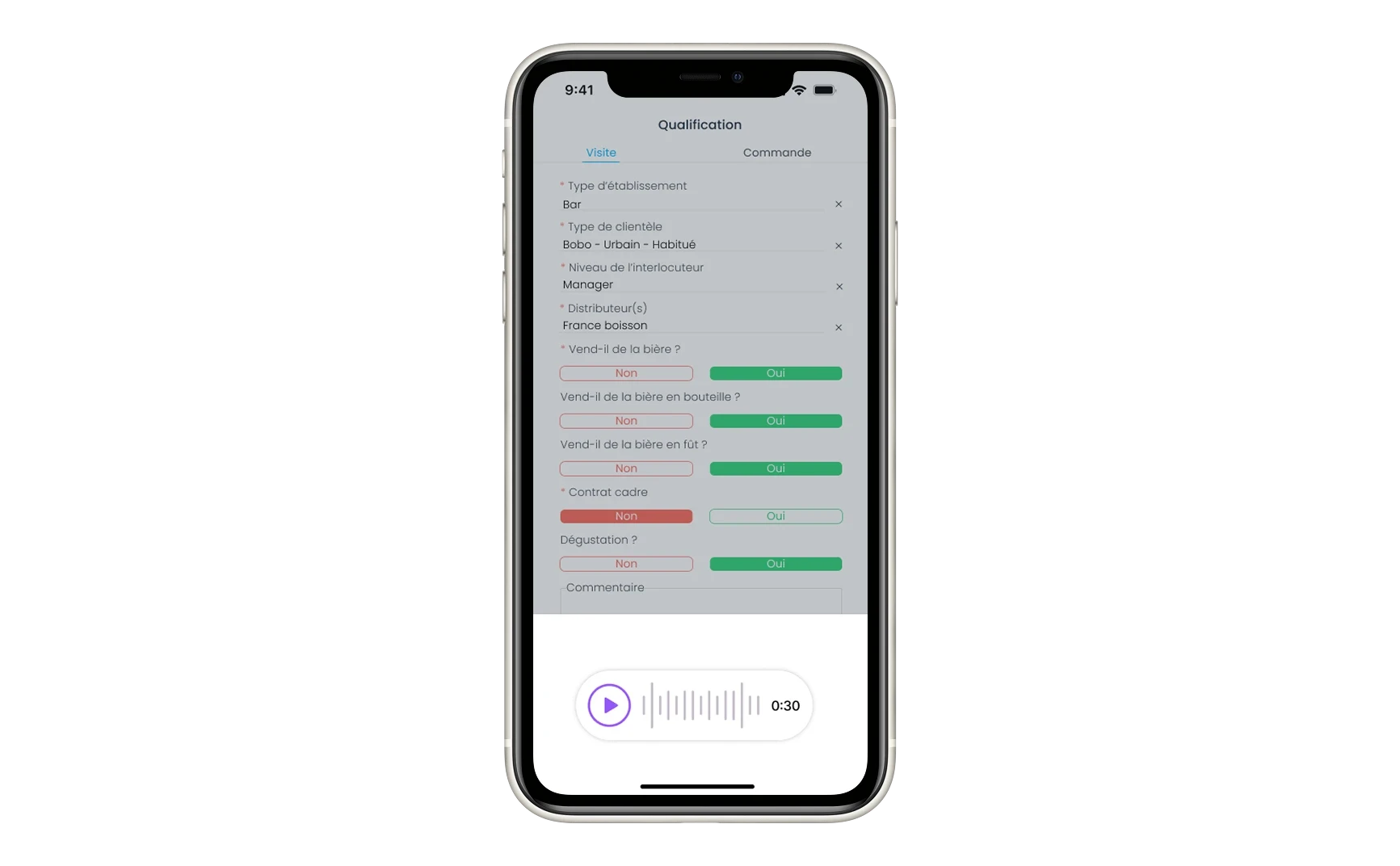
Example of voice note-taking during the visit
The information immediately becomes actionable for everyone.
For the sales rep, it allows them to track their goals, completed actions, and any delays, without having to consolidate multiple sources.
For the manager, the benefits are structural. The mobile application offers a reliable, real-time view of field activity, with clear visibility into the number of visits completed, portfolio coverage, and the progress of actions. Management no longer relies on gut feelings or incomplete reports, but on observable, comparable data.
For the sales organization as a whole, data becomes consistent and actionable. Decisions are based on concrete facts from the field, rather than fragmented or retroactively entered information.
By standardizing practices, assessments, and key performance indicators, the application creates a shared framework. It reduces gaps between sales reps and transforms field information into a powerful collective management lever.
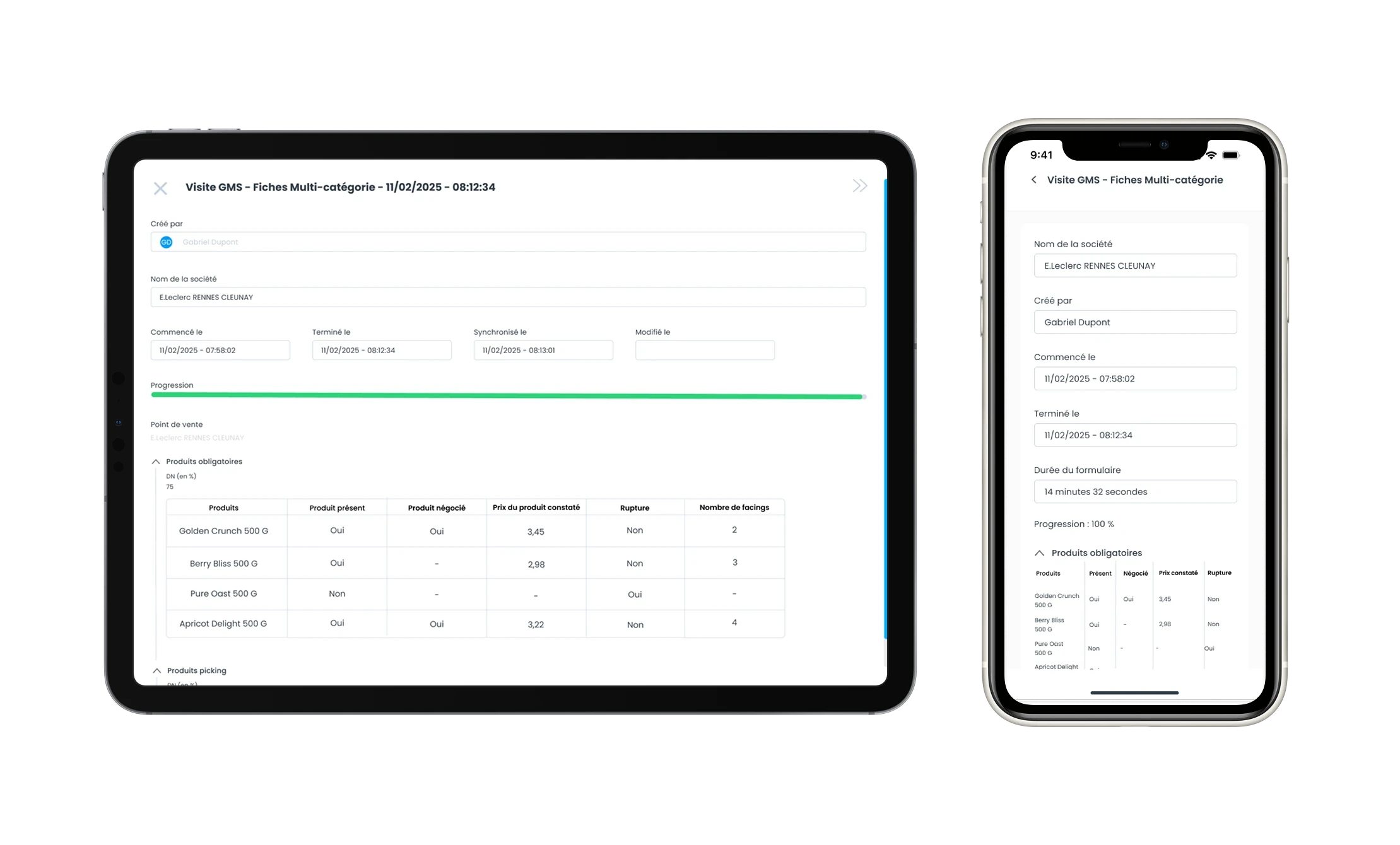
Viewing a completed assessment on tablet / mobile with Sidely CRM
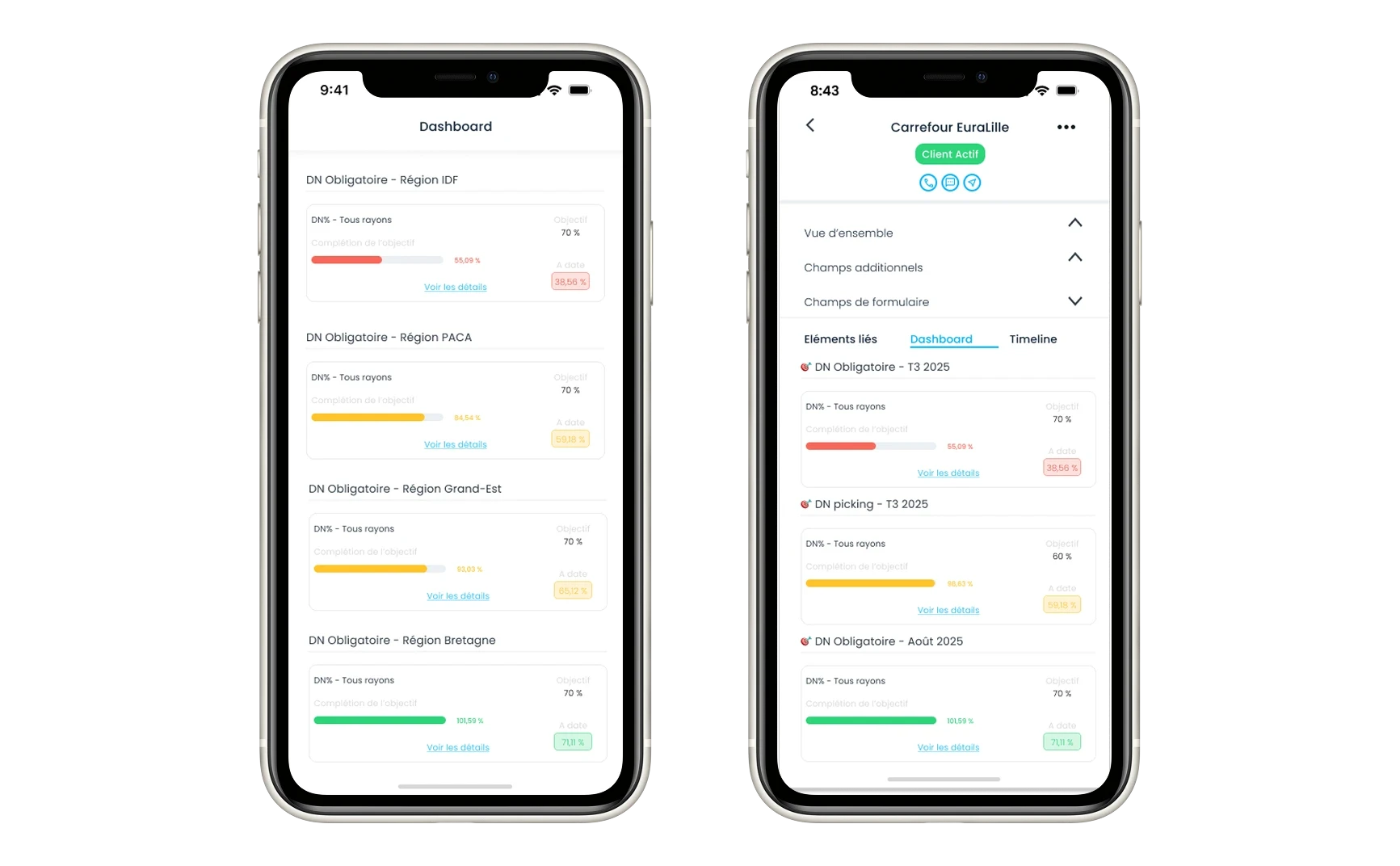
Sales Dashboard
Regardless of the business activity, the logic remains the same: value appears when field information becomes structured, shared, and actionable.
Why a Poorly Chosen Mobile Application Complicates Processes
A poorly chosen mobile application does not simplify daily work. It adds friction. And this friction eventually stiffens, or even degrades, existing processes.
An Application Thought of Only as a Tool, Not as a Link in the Process
Many mobile applications are designed as a technical extension—a mobile version of an existing tool. They are not thought of as an integral building block of the field sales process.
However, field constraints are highly specific: limited time per visit, constant mobility, priorities changing throughout the day, and frequent interruptions. According to several internal studies conducted in sales organizations, nearly 60% of sales reps believe their tools are not adapted to their field reality.
Additionally, an isolated mobile application multiplies workflow disruptions. Double data entry, manual exports, and reentry by head office teams. Each disruption creates a gray area in the process.
Who does what, when, and with which version of the information. In some teams, up to 15% of administrative time is spent managing these disruptions without creating any real value.
Flows That Are Too Rigid for Changing Field Situations
In the field, situations are never linear. A store closes earlier than expected, an appointment is added, a priority changes during the day.
A poorly chosen application often forces rigid workflows with fixed steps and poorly calibrated mandatory fields. However, more than 40% of sales reps report having to alter their daily organization because of constraints imposed by their tools rather than by the field itself.
When the process becomes heavier to follow than to bypass, the tool loses its operational legitimacy.
Too Much Data Entry, Not Enough Value
Many mobile applications are designed primarily for reporting. They multiply fields, forms, and top-down workflows. In this context, adoption drops rapidly. It is common to see that 20% to 30% of the expected information is never entered, or only partially entered.
The perception is clear for the teams: if the application is experienced as a control tool, it never becomes a performance driver. Yet, when chosen well, a mobile CRM can become one of the main drivers of CRM adoption.
Disconnection Between Field and Management
When data is inconsistent from one sales rep to another, consolidation becomes complex. Managers end up with a mass of information that is difficult to use. In some organizations, up to 50% of management time is spent preprocessing or interpreting data rather than analyzing activity.
Decisions are then made based on incomplete indicators.
Essential Criteria for Choosing a Mobile Application for the Sales Force
To summarize this long article, here are the key criteria to validate with your CRM vendor or integrator:
Mobile Ergonomics: The application must be native and designed from the ground up for field use. It should prioritize simple workflows, single-handed use, and an action-oriented logic rather than complex forms. If the tool slows down the sales rep, it will not be used.
Adaptation to Mobile Roles: The solution must adapt to the realities of the field. Workflows, assessments, and use cases should be configurable to your industries, networks, and operational constraints without requiring heavy development.
Complementarity Between Mobile and Web: A mobile-only CRM solution is insufficient. The field application must be backed by a comprehensive web interface, which is essential for planning, activity analysis, managerial oversight, and head office team tasks.
Scalability and Future-proofing: The scalability of the solution is crucial. A mobile application for the sales force must support the growth of your organization and the evolution of your practices without disrupting your existing processes or multiplying tools.
The challenge is not to digitize for the sake of digitizing, but to simplify, structure, and add value to field information. An application that is actually used is one that facilitates the team's work, improves the quality of visits, and strengthens sales management.
Equipping a sales force with a relevant mobile application means starting from the field and moving toward the tools, not the other way around.
Margot has been working in Tech and SaaS for 8 years, with a multi-product experience that has given her a unique understanding of business challenges. On a daily basis, she analyzes, relentlessly tests, and relies on facts to shed light on market trends and help sales teams move forward.
See also

Artificial intelligence and field professions: what our 2026 studies reveal
Adoption, barriers, use cases: discover what our three studies reveal about the role of AI among sector managers, sales representatives, and foodservice sales reps.

CHR and RHF Sales Representatives: portrait of a relationship-driven profession in the era of data
Equipment, productivity, AI: discover the major trends for the HORECA and food service sales profession in 2026 through our field study.

Pharmaceutical Sales Representative in France: Portrait of a Field Job Under Pressure
Compensation, aspirations, AI usage: discover the major trends in the pharmaceutical sales representative profession in 2026 through our field study.

Area Sales Managers in France: who are they and how is the profession evolving in 2026?
Compensation, aspirations, AI usage: discover the major trends in the field sales representative profession in 2026 through our field study.
The area manager professions in 2026
Discover the trends, the challenges, and the key figures.