

How to find and manage your pharmacies in your CRM
Create your pharmacy territory, geolocate your drugstores, and plan your routes directly from your CRM. A comprehensive method for pharmaceutical sales forces.

In short
9 min read
A well-configured CRM centralizes pharmacy data to optimize operational management and the accuracy of sales rounds.
Creating pharmacies requires baseline information: name, customer status, account owner, and geographic coordinates (latitude/longitude).
Three methods allow you to populate your database: manual entry for individual pharmacies, Excel import for large volumes, and automated tools such as Sidely LeadGen.
The company file is the heart of management: it structures point-of-sale information, traces interaction history on the timeline, and provides access to linked documents.
Mobility is facilitated by field-optimized interface formats that allow voice dictation of notes and quick access to key indicators and historical forms.
Map visualization and dynamic list views make it possible to finely segment pharmacies and prioritize strategic accounts based on geographical or organizational criteria.
Regular data maintenance, particularly the correction of geographical coordinates, guarantees the reliability of analyses and the fluidity of the sales team's experience.
Your points of sale are at the heart of your commercial strategy. In the pharmacy and parapharmacy sector, the quality of field management directly relies on the reliability of your pharmacy network. Quickly identifying a pharmacy, accessing its key information, visualizing its geographical position, and keeping its data up to date have become prerequisites for optimizing your sales visits and prioritizing your sales actions.
The CRM plays a central role here. When properly configured, it becomes a true operational management tool, capable of centralizing all your pharmacy data, facilitating the geolocation of stores, and structuring pharmacy network updates. Conversely, a poorly filled out or under-exploited CRM generates wasted time, poorly planned visits, and a partial view of your territory.
In this article, we offer a clear and structured method to find, visualize, filter, and update your pharmacies in your CRM. From creating points of sale to enriching them geographically, and leveraging views and field maps, you will discover how to transform your pharmacy database into a driver of sustainable sales performance.
Finding pharmacies in your CRM
Creating pharmacies in your CRM
Creating a pharmacy in a CRM relies on a foundation of essential information. At a minimum, each point of sale must include the pharmacy name, its status (customer, active customer, prospect...), the owner of the account (the sales representative in charge), as well as its geographical coordinates (latitude and longitude). These elements determine the quality of segmentation, field planning, and geolocation.
Several methods allow you to create your pharmacies efficiently.
Manual creation
This method is suitable when you occasionally add a point of sale. From the CRM file or directly from the map, you enter all the useful information: coordinates, main contact, phone, email, website, visit frequency, and specific business fields.
The visit frequency is a structuring element. It allows you to organize your tours and adapt the sales effort to the potential of each pharmacy, with greater commercial pressure on strategic accounts.
Bulk creation via an Excel file
Bulk import is recommended during the initial setup of the network or during a major enrichment. The file must contain at least the name, status, owner, and complete address. The latitude and longitude columns are mandatory but can be left blank, as the CRM automatically calculates coordinates from the addresses provided. Additional fields must strictly respect the nomenclature defined in your CRM to avoid any import errors.
Generating prospects via Sidely LeadGen
Sidely offers a LeadGen module to automatically create accounts from a qualified prospect database. By filtering by geographical area or point of sale typology, you can quickly integrate new pharmacies into your network without manual re-entry.
Reading and accessing the right information
On the web
The account file is the main entry point to understand and manage a pharmacy. It centralizes all commercial and operational information around three major groups.
Point of sale information groups the mandatory fields, additional fields configured by management, and fields from field forms. This data allows for precise qualification of each pharmacy and ensures reliable segmentation.
The timeline, located in the center of the card, provides a chronological view of all interactions. It tracks data updates, visits, calls, completed forms, and past sales actions. Each event can be consulted and contributes to the continuity of the follow-up.
Related items give access to all objects linked to the pharmacy: contacts, events, assessments, notes, documents, campaigns, and photos. This organization guarantees an exhaustive view of the account, essential for preparing each visit effectively.
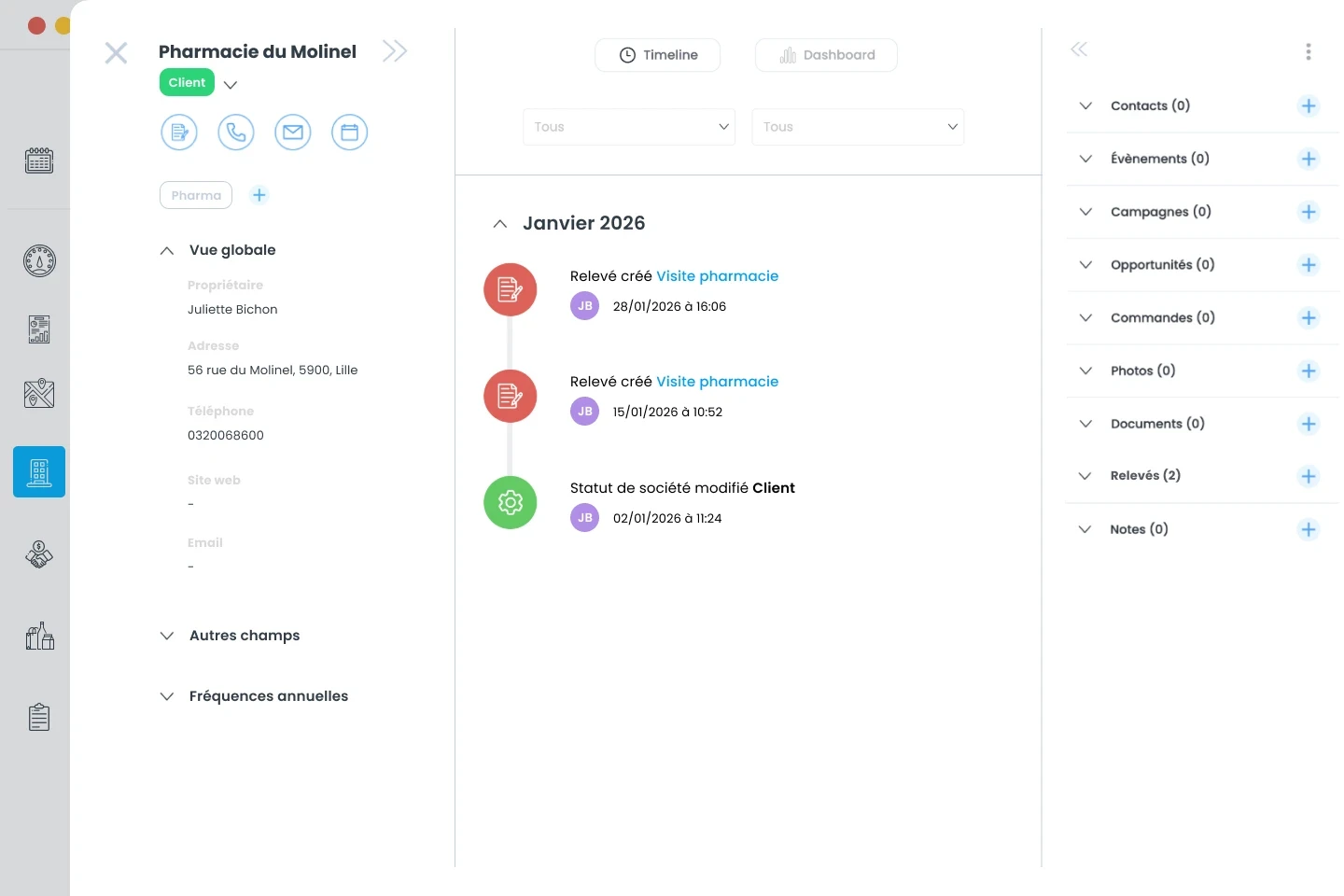
Example of an account view in the Sidely CRM
On mobile
On mobile, the account file is designed for field use. Coordinates, additional fields, and performance indicators are accessible in a few clicks. Historical forms make it possible to track the evolution of data collected during visits, while report fields summarize key indicators such as revenue or out-of-stock products.
Note-taking, including via voice dictation, and consulting event history offer significant time savings for mobile sales representatives.
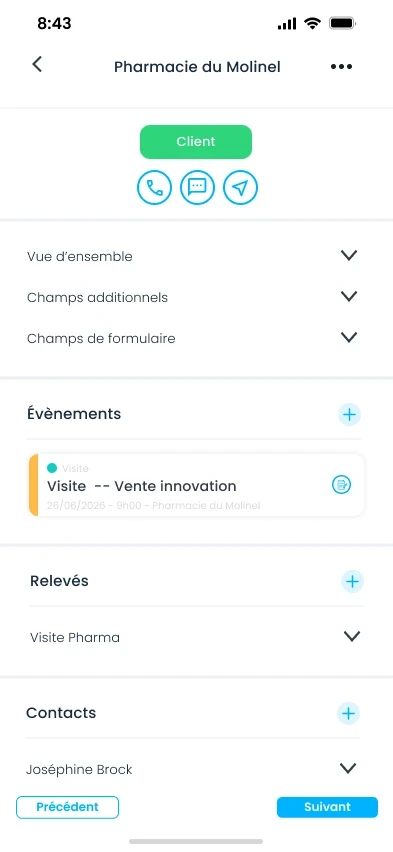
Example of an account view on the Sidely mobile app
Visualizing your pharmacies in the field
The map is a key tool for store geolocation. From your mobile phone or tablet, you can visualize your entire pharmacy network and switch between two display modes.
The map view provides an immediate geographical reading of your pharmacies and parapharmacies. It facilitates the understanding of territorial distribution and the optimization of tours. From the map, each pharmacy is interactive. By clicking on a point, you can access GPS navigation, the account card, or directly launch forms related to the point of sale. This continuity between visualization and action strengthens field efficiency.
The list view allows for quick tracking thanks to the display of statuses and key information under each company name.
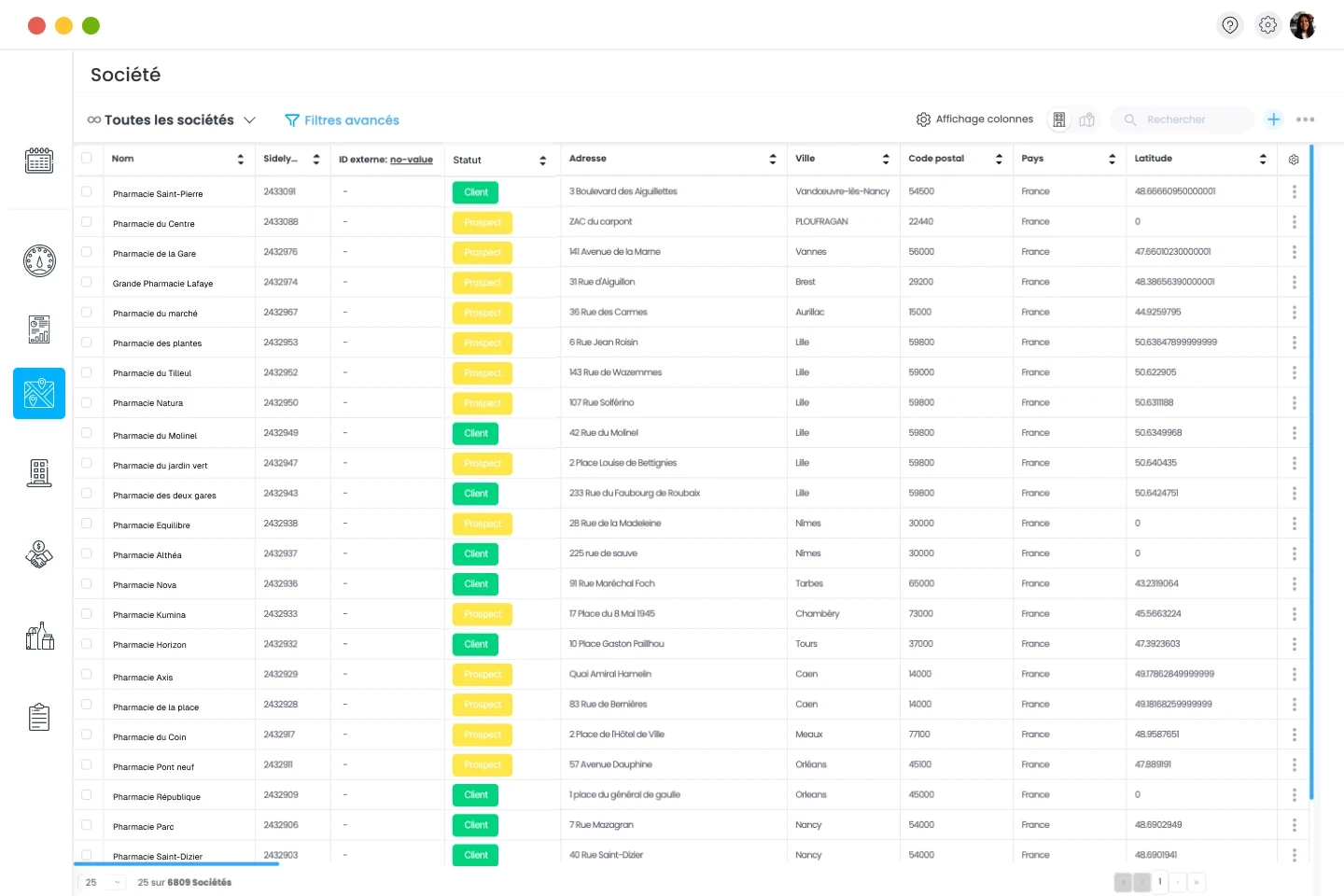
Example of a list view in Sidely
Effectively managing your pharmacy network
Filtering and segmenting your pharmacies
Managing a high-performing pharmacy network relies on the ability to segment points of sale. Advanced filters and dynamic views allow you to work on consistent subsets without starting from scratch for each analysis.
Views facilitate the prioritization of strategic customers, tracking high-potential prospects, or identifying pharmacies that need a quick visit. They can also be built by owner to track the workload and performance of each sales representative.
Certain views respond to specific operational challenges, such as tracking pharmacies that display a specific branding unit. This segmentation ensures maintenance, evaluates investments, and plans deployments.
Segmentation by region or sector optimizes route planning and territory allocation. Finally, analyzing high-contribution customers allows efforts to be focused on the most profitable accounts.
Updating your pharmacies in your CRM
Pharmacy network updates are essential to guarantee the reliability of your analyses and the relevance of your tours. Geographical enrichment allows you to verify and update the coordinates of selected pharmacies in a few clicks.
After an import or enrichment, it is recommended to check companies whose latitude or longitude is missing in order to quickly correct anomalies. In case of an address error, auto-completion of the address field facilitates manual entry of the correct location.
Keeping addresses up to date avoids geolocation errors, improves travel planning, and guarantees a smooth field experience. A regularly updated pharmacy database is a key factor in sustainable sales performance.
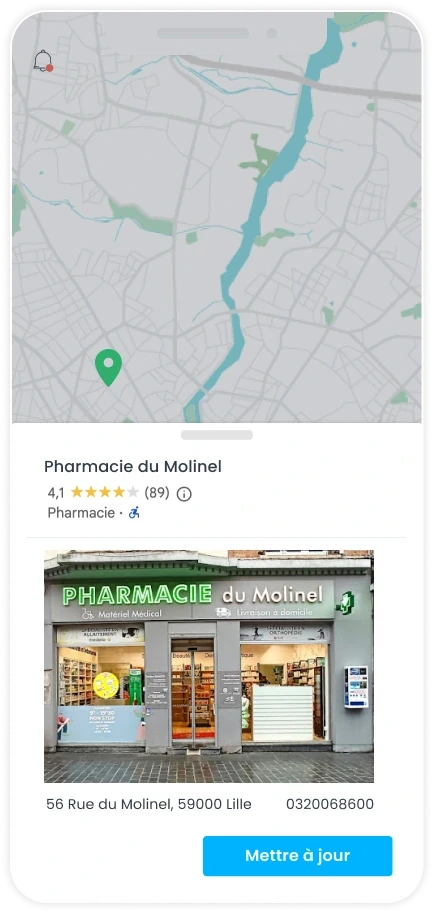
Example of an update on mobile
Finding and managing your pharmacies effectively in a CRM is not just an administrative task. It is a strategic lever to optimize tours, improve the quality of visits, and closely manage sales performance. A structured creation of points of sale, a rich and accessible account card, relevant map visualization, and well-defined segments form the foundations of a well-managed pharmacy network.
Store geolocation and pharmacy database updates ensure data reliability and strengthen consistency between sales strategy and field actions. By working with targeted views and keeping your information up to date, you gain efficiency, responsiveness, and visibility in your territory.
A CRM designed for field sales forces then becomes a true daily management tool, capable of supporting the growth of your business in pharmacies and parapharmacies.
Margot has been working in Tech and SaaS for 8 years, with a multi-product experience that has given her a unique understanding of business challenges. On a daily basis, she analyzes, relentlessly tests, and relies on facts to shed light on market trends and help sales teams move forward.
See also

Artificial intelligence and field professions: what our 2026 studies reveal
Adoption, barriers, use cases: discover what our three studies reveal about the role of AI among sector managers, sales representatives, and foodservice sales reps.

CHR and RHF Sales Representatives: portrait of a relationship-driven profession in the era of data
Equipment, productivity, AI: discover the major trends for the HORECA and food service sales profession in 2026 through our field study.

Pharmaceutical Sales Representative in France: Portrait of a Field Job Under Pressure
Compensation, aspirations, AI usage: discover the major trends in the pharmaceutical sales representative profession in 2026 through our field study.

Area Sales Managers in France: who are they and how is the profession evolving in 2026?
Compensation, aspirations, AI usage: discover the major trends in the field sales representative profession in 2026 through our field study.
The area manager professions in 2026
Discover the trends, the challenges, and the key figures.