

Field visit report: examples and template in a CRM
Discover an example of a field visit report, a template to follow, and how to easily write it in a sales CRM.

In short
7 min read
A field visit report is a structured summary aimed at keeping a clear record, sharing information across the team, and steering sales activity.
It serves to ensure rigorous customer follow-up, capitalize on field feedback (competition, needs, opportunities), and structure future sales actions.
An effective report must be short, structured, and actionable, including essential information such as the objective, observations, and decisions made.
Entering data into a mobile CRM centralizes information, facilitates reporting, and improves collaboration between road warriors and the headquarters.
Best practices include standardizing templates, writing the report immediately after the visit, and systematically integrating concrete follow-up actions.
Field sales teams carry out numerous visits every week. These appointments provide an opportunity to discuss matters with contacts, negotiate sales actions, check product presence, or identify new opportunities. However, without structured follow-up, a large portion of this information can quickly be lost.
This is precisely the role of the field visit report. A field visit report is a structured summary of a sales meeting with a client or prospect. It keeps a clear record of the visit, shares information with the sales team, and ensures follow-up on agreed-upon actions.
For companies with mobile sales forces, the visit report is also an essential management tool. It allows managers to understand what is actually happening in the field, identify business opportunities, and improve customer account follow-up.
In this article, we explain what a field visit report is, what information it should contain, and how to structure it effectively. You will also discover a concrete example of a visit report created in a CRM, as well as several best practices to improve the quality of your sales teams' reports.
What is a field visit report?
A sales visit report is a document that summarizes the information gathered by a sales representative during a meeting with a customer or prospect. It serves to keep a structured record of the visit, share information with the sales team, and ensure follow-up on decided actions.
In practice, it is a written summary prepared after a field visit, which covers the essential elements of the discussion: context of the meeting, needs expressed by the client, decisions made, and next sales actions.
What is a sales visit report used for?
The visit report serves several functions within the sales organization.
Ensuring customer follow-up
It keeps track of the history of exchanges with a customer. During the next visit, the sales rep can quickly find what was previously discussed (expressed needs, objections, decisions made, or detected opportunities…).
Preventing information loss
Without a structured report, some of the information may remain in the sales rep's head or be forgotten. By systematizing reports, the company capitalizes on information collected in the field: customer feedback, competitors' actions, problems at the point of sale, or new business opportunities.
Sharing information with the team
Reports do not only benefit the sales representative concerned. They allow everyone to have a clear view of the commercial relationship. A manager can follow the evolution of an account, a colleague can take over a file in case of absence, and the marketing or customer service teams can better understand customer expectations.
Managing sales activity
For sales directors, visit reports provide visibility into the field: state of the points of sale, detected opportunities, observed competition, or problems encountered.
When entered directly into a CRM, sales directors and managers can transform this data into concrete actions.
Structuring future actions
A good report always mentions the next actions to be taken, such as sending a proposal, scheduling a new visit, or organizing a product demonstration.
Essential information to include in a visit report
An effective report is short, structured, and actionable. It typically includes the following information:
the customer or point of sale visited
the visit date
the contact person met
the objective of the visit
the topics discussed
the field observations (needs, objections, competition)
the decisions made
the follow-up actions
Today, these reports are most often entered directly into a sales CRM, frequently from a mobile application. This centralizes information, facilitates reporting, and improves collaboration among sales teams.
Visit report in distribution networks
A sales visit report in the Horeca (CHR) or supermarket (GMS) sectors is a document that summarizes the information collected by a sales rep during a visit to an establishment or store. The sales rep records key elements of the meeting (contact, needs, decisions, opportunities, actions to follow).
Nevertheless, the content of the visit report varies depending on the type of distribution channel, as the business challenge is not the same between supermarkets and Horeca.
Supermarket (GMS) visit report
In large and medium-sized supermarkets (GMS), sales visits are often linked to shelf management and product performance in-store. The report must therefore integrate highly operational information on product availability and visibility.
A supermarket visit report generally contains:
the store visited and manager met
the state of the shelf layout (shelf presence, facings, out-of-stock)
the stock level or supply chain issues
the promotional operations underway
the presence of competitors
actions taken at the point of sale (product highlights, shelf space negotiation, ordering).
sales plans
This information allows the company to monitor in-store performance and optimize the visibility of its products.
Horeca (CHR) visit report
In the Horeca (Cafés, Hotels, Restaurants) channel, the sales approach is generally more relationships-driven and focused on growing revenue with the establishment.
The visit report places more emphasis on:
the establishment visited and contact met (manager, chef, purchasing manager)
the products listed or to be listed
the volumes ordered or planned
the needs expressed by the customer
product feedback (quality, rotation, satisfaction)
development opportunities (new menu, new products, trade support).
In this context, the report serves primarily to track the business relationship and sales opportunities.
Example of a field visit report (example with Sidely)
In this section, we present an example of a field visit report that you can create with the Sidely CRM. We offer two complementary templates for visit reports - and therefore two complementary ways to fill out reports: either guided by shelf department or guided by contact. The example below is guided by shelf department.
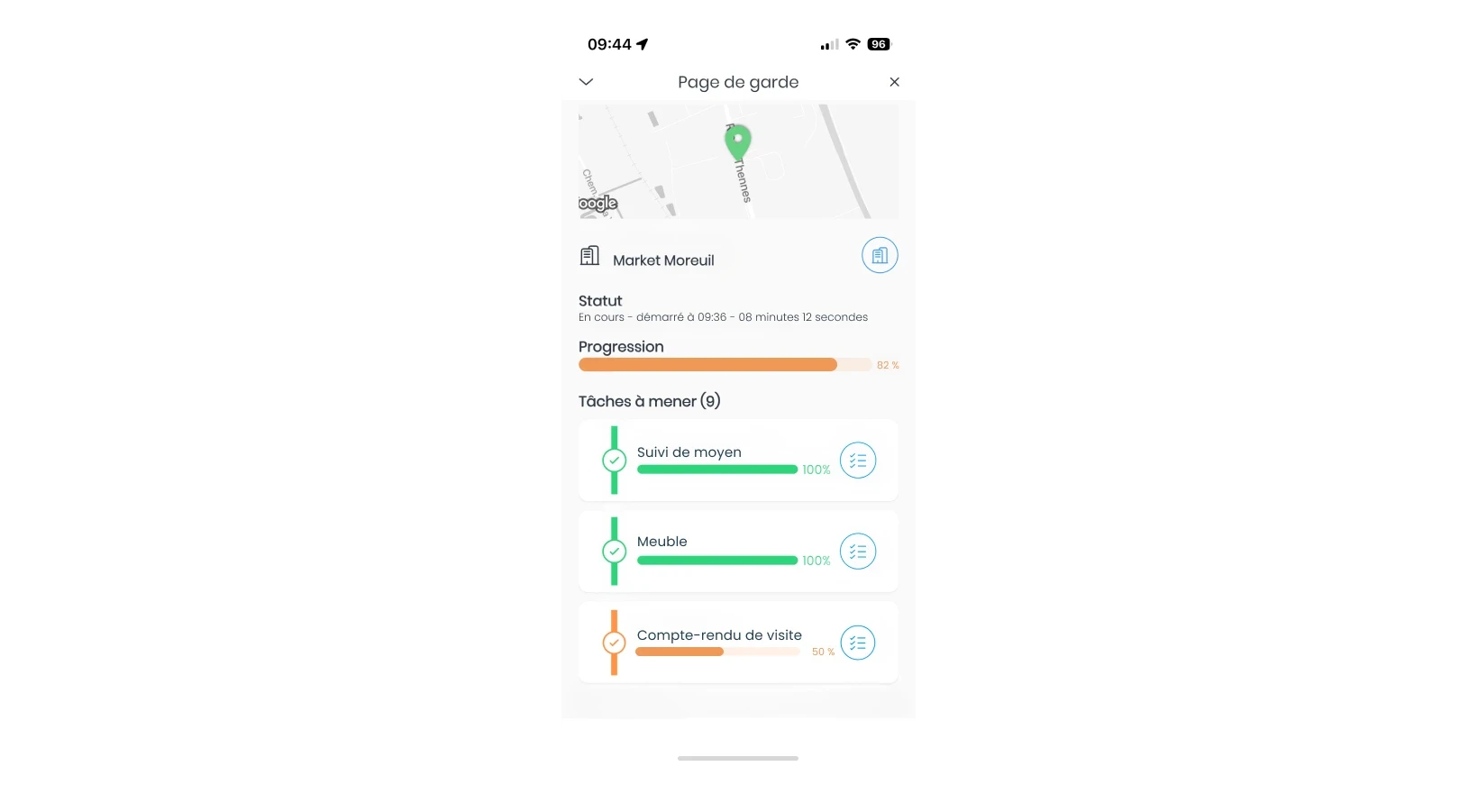
The visit report, as its name suggests, is filled out at the end of a sales visit. In this example, it is a visit by an area manager to a supermarket. After completing all of his point-of-sale audits, such as monitoring the assets in place or ordering POS materials, he can then complete his visit report.
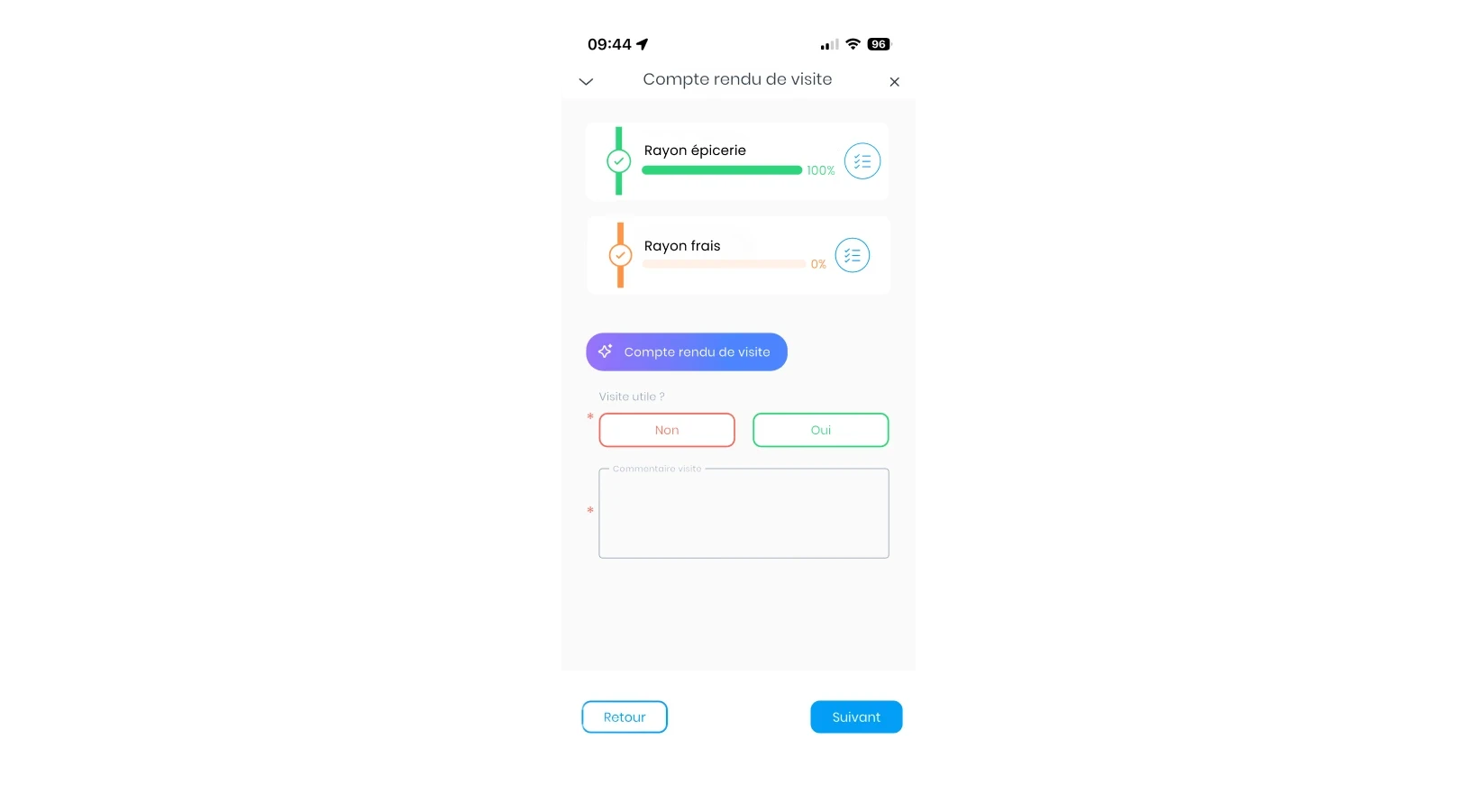
To do this, he clicks on “Visit Report”. The application then displays the various departments he is responsible for. In our example, the grocery department report has already been completed. He still needs to fill in the fresh food department report as well as the overall visit report.
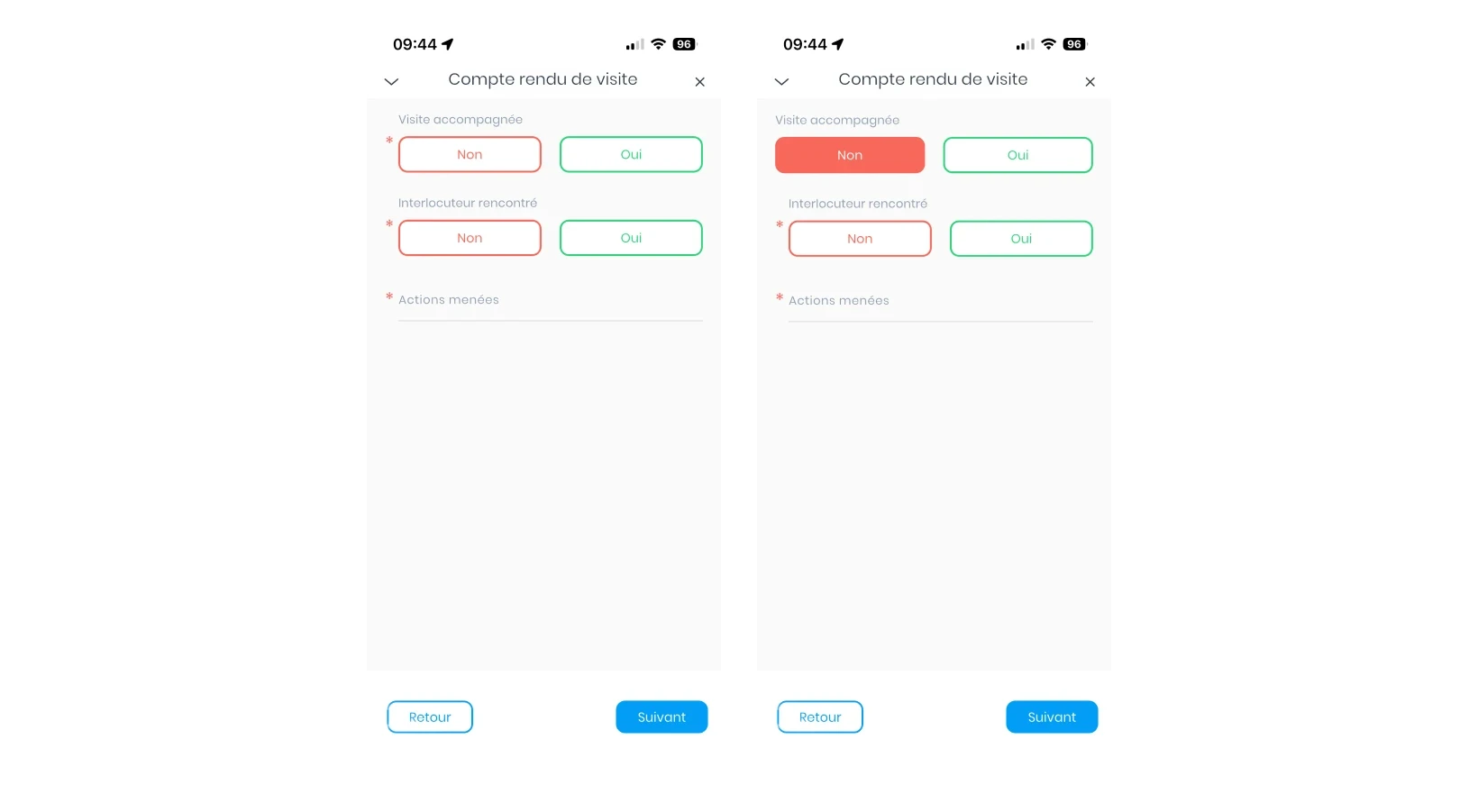
When he selects a department, a series of pre-formatted questions appears. These questions were defined beforehand by management and the sales department to structure the follow-up of field visits and facilitate data entry. The salesperson indicates, for example, whether the visit was conducted alone or accompanied.
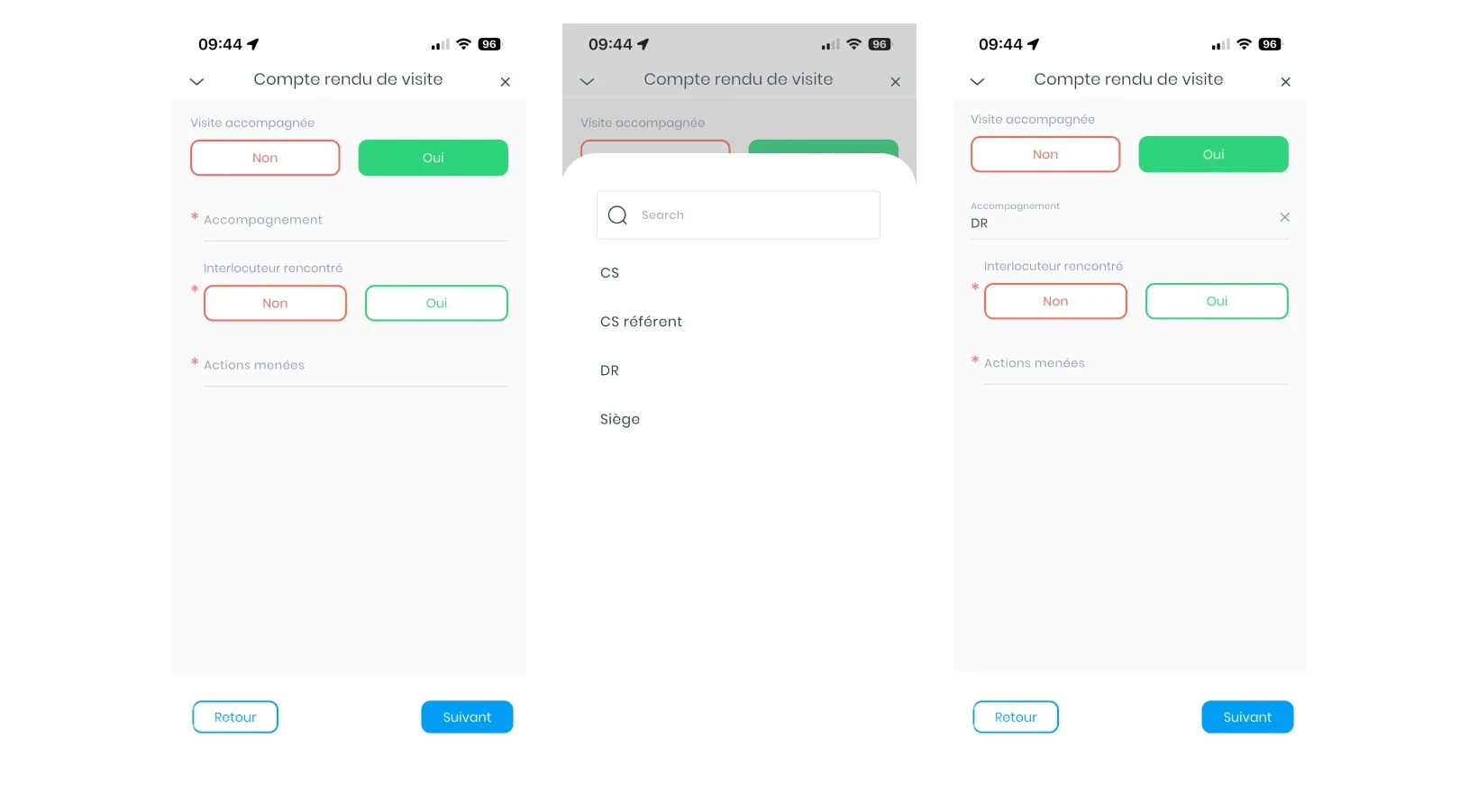
If the visit is accompanied, they can choose the person present from a predefined list of answers. This list is fully customizable to match the company's context and its sales organization.
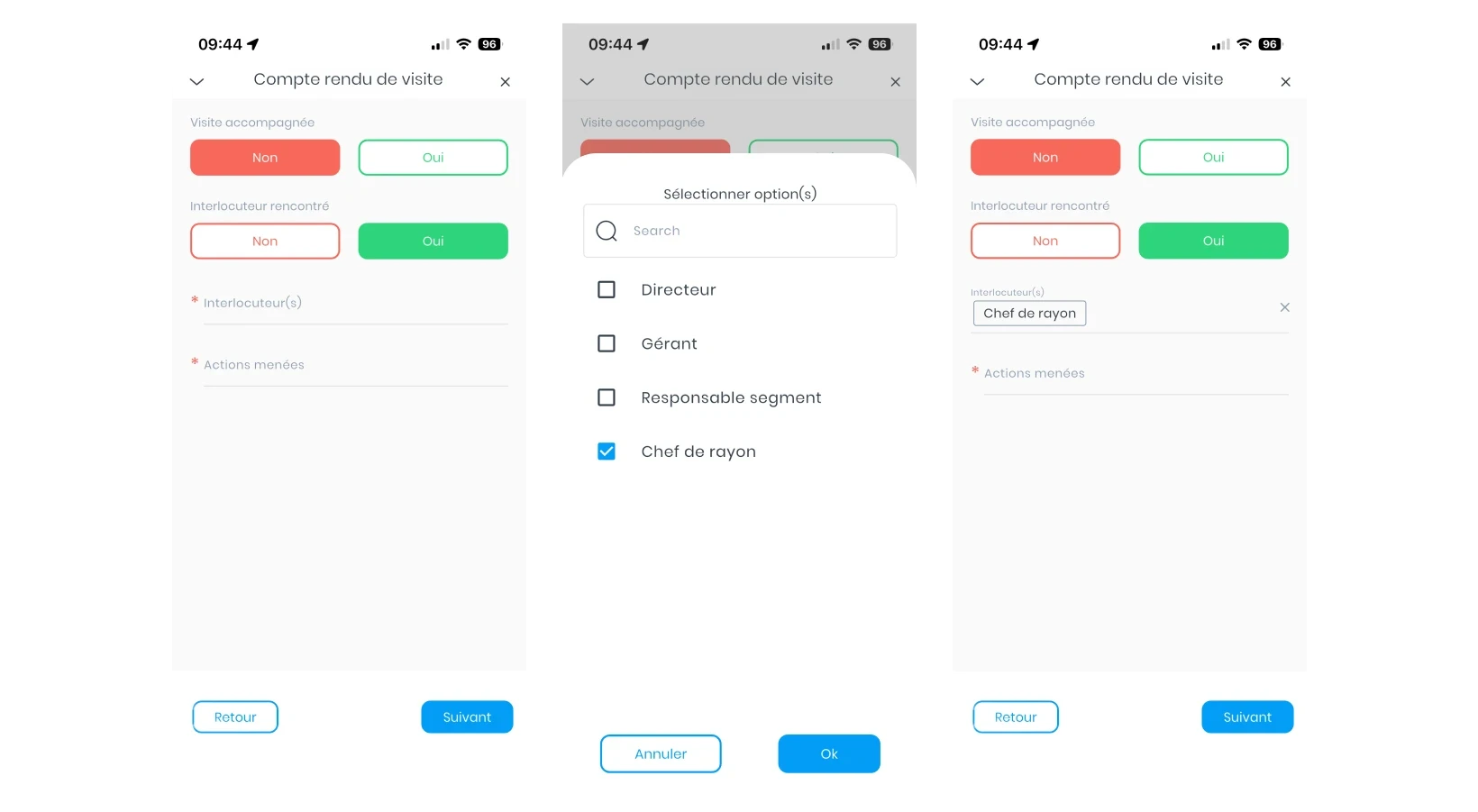
Sales reps can also specify if they met a key contact during the visit. If so, a list appears to select the person concerned, such as the department manager or the store manager.
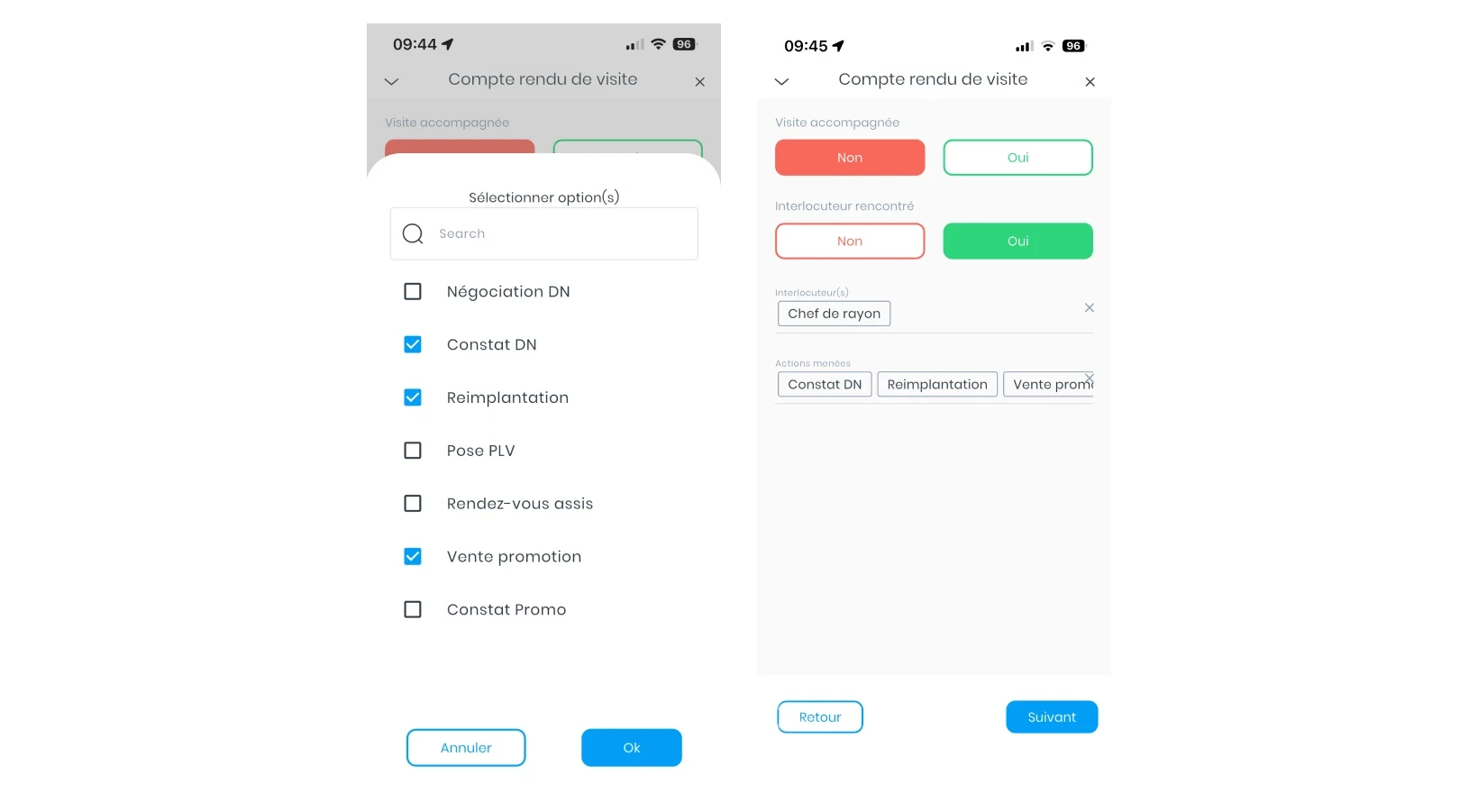
The salesperson then indicates the different actions taken during the visit for each department. These actions are directly linked to the objectives defined beforehand. Indeed, when preparing their routes, salespeople enter their visit objectives. The report then automatically adapts to these objectives, allowing the alignment of the sales visit report with actions actually taken in the field.
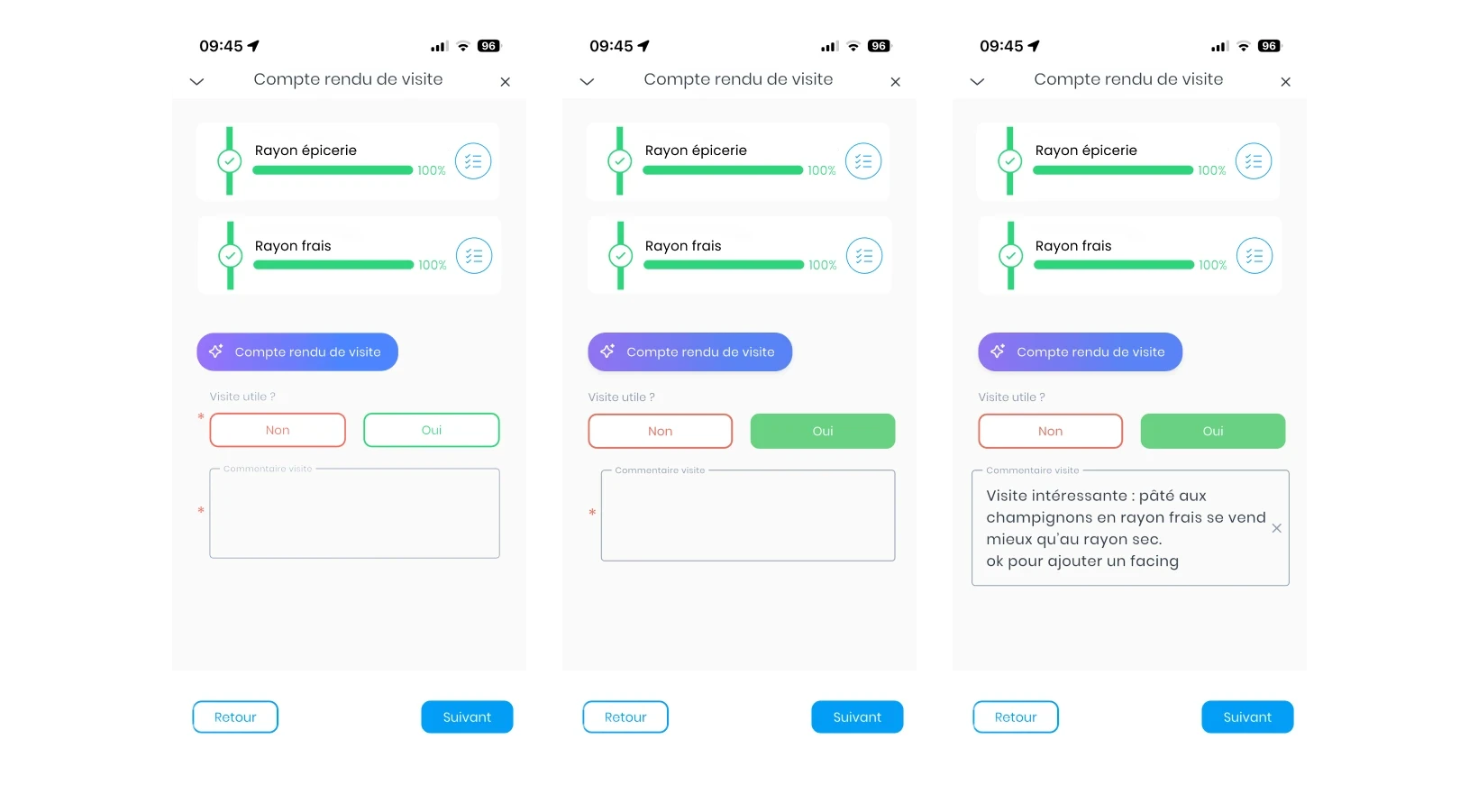
Finally, the salesperson completes an overall report of the visit, which summarizes all observations made in the store. He can indicate whether the visit was useful and add a general comment. This comment is free-form and can be entered via keyboard or voice dictation, which facilitates rapid entry after the visit.
Each company can, of course, customize its field visit report template to match its needs, sales organization, and objectives. The example presented here simply illustrates one of many ways to structure a visit report in a CRM.
Best practices for an effective visit report
Standardize the report structure
For a visit report to be effective, it must be easy to fill out and structured. Without this, you won’t have reliable, clear, and above all, usable reports. The first best practice is therefore to use an identical report template for the entire sales team.
Reports are much more usable when they are structured with specific fields rather than written entirely as free text.
Adapt the report to the type of visit
The information to be collected may vary depending on the business context. The report template must therefore be adapted to the type of channel but also to the objective of the visit.
In Horeca, for example, not all visits have the same purpose. A tasting visit carried out with a brand ambassador will not lead to the same type of report as a delivery visit or an audit aimed at verifying compliance with commercial agreements.
Write the report immediately after the visit
One of the most common mistakes is filling out reports several hours or days after the visits. Most of the time this happens because sales reps do not have a tool that allows them to do it while they are still in the store.
You must therefore equip your sales reps with a mobile sales CRM that has:
An application that works without an internet connection
An application with voice dictation (the report can be filled out while walking, for example)
An application that automatically synchronizes as soon as the connection returns (so your sales reps no longer have to worry about whether the sales visit report is properly synced or not).
Get straight to the point
"Less is more" as the English say: for this specific case, they are right. A good report is not a long narrative. It must be short and actionable. Ask them for what really counts, and that's it.
By asking factual questions, you separate the observed facts from the opinions or analysis of your sales force. This distinction is important because you base your future management on field facts and concrete data, not on feelings - which might not reflect reality.
Structure sales actions
A visit report must always end with concrete actions. Ask to specify: the action taken and future actions to be carried out (during the next visit); the responsible person and a deadline.
This information can be retrieved when your reps organize their next sales route. For example, "schedule tasting with ambassador for Thursday week" is taken into account for the sales route in two weeks.
A visit report must always conclude with concrete and clearly defined actions. It is important to specify: the action taken during the visit, the actions to plan for the future (such as for the next visit), the responsible person, as well as a deadline.
This information serves as the basis for preparing the next sales interactions. In particular, it can be reused when organizing the next sales route.
For example, an action noted in the report as "schedule a tasting with a brand ambassador next Thursday week" can be directly integrated into the route planned in two weeks. This structuring turns visit reports into real follow-up and sales planning tools.
Maintain sales discipline
The quality of the reports depends above all on the discipline of the sales team. To ensure your sales reps stick to it, use your CRM software. For example, a report is mandatory after each visit: your reps cannot validate audits until the report is completed. (1 validated audit = 1 validated visit = increase in the commercial objective achieved).
In this article, we looked at what a field visit report is, what information it should contain, and how to adapt it according to the type of distribution channel. We also presented a concrete example of a visit report in a CRM, as well as several best practices for structuring and leveraging this information.
Today, using a mobile CRM allows you to go even further. By standardizing report templates and making them easy to fill out directly in the field, companies can save time, improve the quality of data collected, and gain better visibility over their sales activity.
Margot has been working in Tech and SaaS for 8 years, with a multi-product experience that has given her a unique understanding of business challenges. On a daily basis, she analyzes, relentlessly tests, and relies on facts to shed light on market trends and help sales teams move forward.
See also

Artificial intelligence and field professions: what our 2026 studies reveal
Adoption, barriers, use cases: discover what our three studies reveal about the role of AI among sector managers, sales representatives, and foodservice sales reps.

CHR and RHF Sales Representatives: portrait of a relationship-driven profession in the era of data
Equipment, productivity, AI: discover the major trends for the HORECA and food service sales profession in 2026 through our field study.

Pharmaceutical Sales Representative in France: Portrait of a Field Job Under Pressure
Compensation, aspirations, AI usage: discover the major trends in the pharmaceutical sales representative profession in 2026 through our field study.

Area Sales Managers in France: who are they and how is the profession evolving in 2026?
Compensation, aspirations, AI usage: discover the major trends in the field sales representative profession in 2026 through our field study.
The area manager professions in 2026
Discover the trends, the challenges, and the key figures.